
How do I delete messages from my account?
Regular messages that you or your coparent sent cannot be edited or individually deleted. Keeping the shared communication history intact gives both parents a consistent record.
Delete an identified test message
A message that BestInterest identifies as a self-test is the exception. Open the message and look for the notice This is a test message you sent to yourself.
- Tap Delete Test Message.
- Review the warning that only test messages can be deleted.
- Tap Delete to confirm.
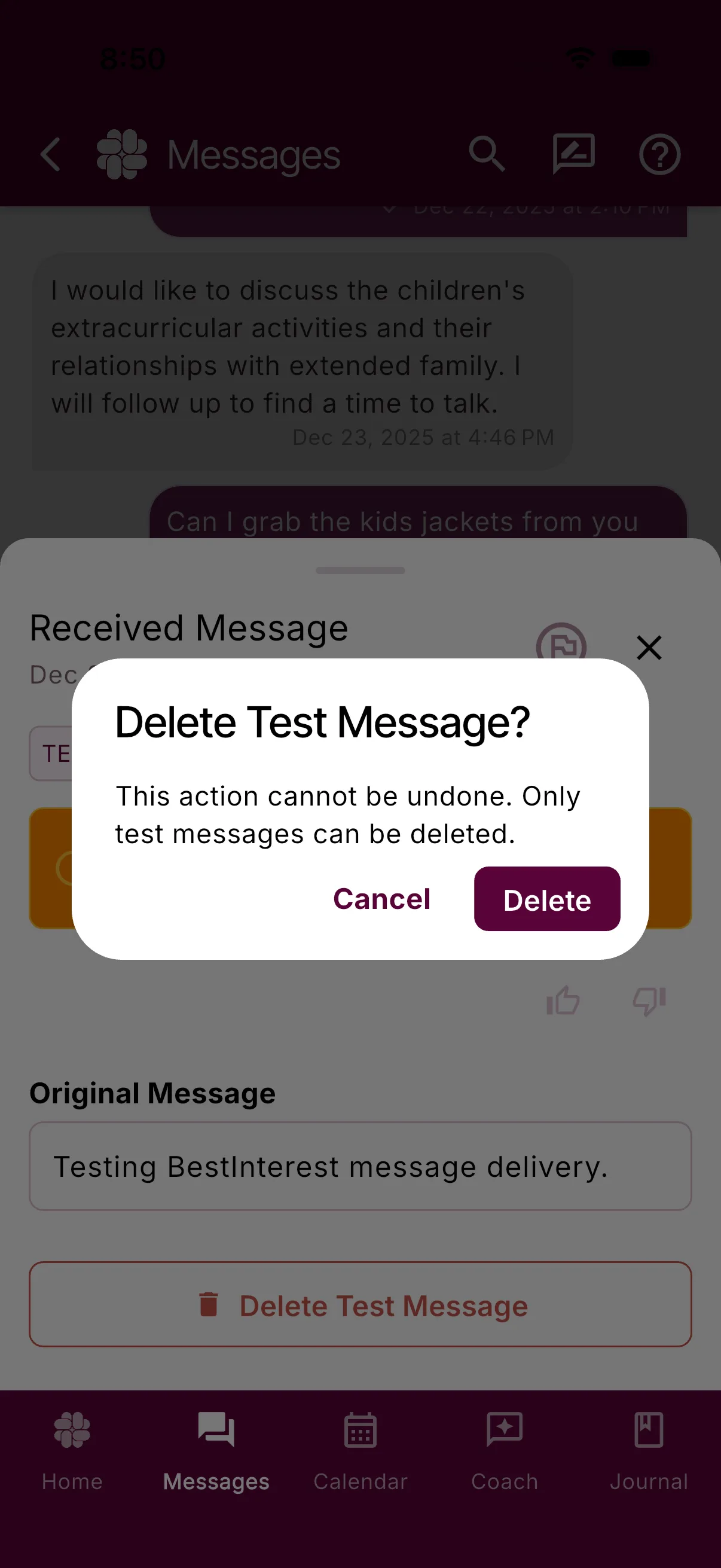
The action cannot be undone. The button is available only on messages BestInterest has identified as test messages.
Why regular messages remain
BestInterest keeps sent and received messages as an uneditable communication record. Message details include timestamps and delivery status. Generated reports include a Report ID and Verification PIN that can be checked on the report verification page.
If both parents agree that a message is no longer relevant, you can document that agreement, but the original message remains in BestInterest.
What if I delete my account?
Account deletion removes access immediately and deletes or anonymizes your profile and personal app data. Your coparent may retain their own copies of shared records, generated reports remain available until they expire, and BestInterest retains limited internal records for security, support, and legal obligations.
Was this helpful?
Still need help?
Contact Support