
How to Find Coparenting Guides, Podcasts, and Videos in the App
BestInterest keeps its reading, listening, and viewing material together under one heading: Resources, on the More Tools screen. None of it needs a paid plan, and all of it opens inside the app.
Open the Resources section
- Go to Home.
- Tap More Tools, the button under your dashboard cards.
- Scroll down past Communication, Planning, Records, and Reflect & Grow until you reach the Resources heading.
Seven entries sit under that heading.
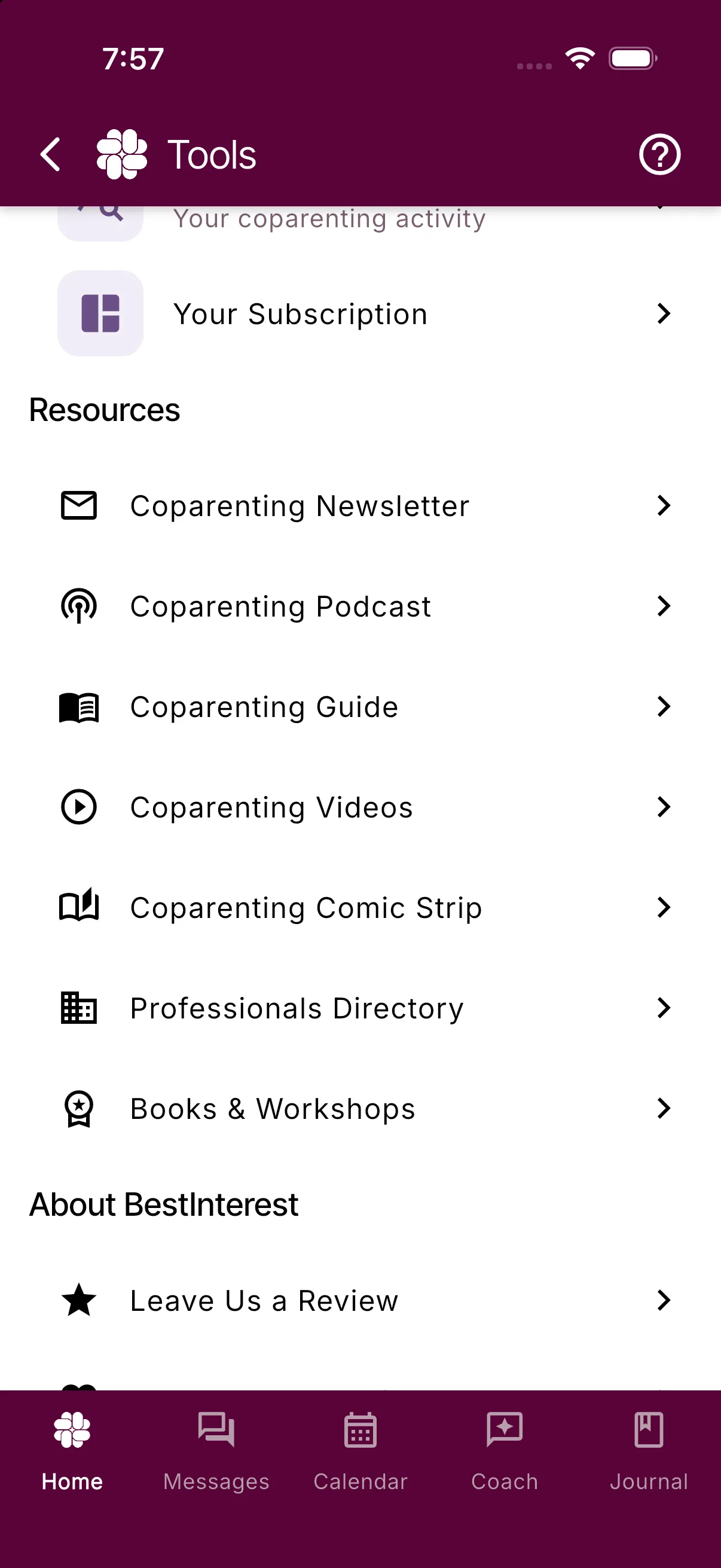
What each entry opens
- Coparenting Newsletter: a small sign-up panel, not a web page. Your account email is already filled in. Tap Subscribe to join the free newsletter of coparenting tips and app updates.
- Coparenting Podcast: the Coparenting Beyond Conflict Podcast page, full screen, with every episode listed.
- Coparenting Guide: the full article library, full screen. The next section covers it in detail.
- Coparenting Videos: a panel that plays the BestInterest video playlist.
- Coparenting Comic Strip: a panel showing the Coparenting in Captivity comic.
- Professionals Directory: the BestInterest Professionals Network page, full screen, with attorneys, mediators, therapists, coparent coaches, parenting coordinators, and other specialists.
- Books & Workshops: the Coparenting Resources Guide page, full screen, with recommended books, courses, apps, and links for coparents.
Read the Coparenting Guide
- Tap Coparenting Guide. The library opens with a search box at the top.
- Type a subject such as custody schedules, expenses, or boundaries and tap Search, or scroll through the article cards. Topic chips at the bottom of the list narrow the guide to one subject.
- Tap an article to read it. Links to other BestInterest pages stay inside the app; links to outside websites open in your phone’s browser.
- To pass an article along, tap the Share icon at the top right. It sends the article’s web link through whichever app you pick.
The same library is on the website at bestinterest.app/articles, and the podcast at bestinterest.app/coparenting-podcast, if you prefer a larger screen.
A faster way to the guide
Tap the Help icon (the question mark) at the top of Home or More Tools. The Help & support sheet lists Help Center, Coparenting Guide, and Contact Support. Tap Coparenting Guide to open the same library.
Get back to the app
- Full-screen pages (Podcast, Guide, Professionals Directory, Books & Workshops) have a back arrow at the top left. One tap closes the page and returns you to More Tools, however far you have read.
- Panels (Videos, Comic Strip, Newsletter) have an X at the top right. Tap it to close the panel.
Related
Frequently asked questions
Where did the Guide tile on Home go?
It moved. Tap More Tools on Home and open Coparenting Guide under Resources, or tap the Help icon at the top of Home and choose Coparenting Guide.
Can I send a guide article to someone?
Yes. With the article open, tap the Share icon at the top right to send its web link through any app on your phone.
Can I bookmark favorite articles inside the app?
No. The app has no saved-articles list. Share the link to yourself, or search the Coparenting Guide again next time.
Do the videos or the comic strip need another app?
No. Both play in a panel inside BestInterest. Tap the X at the top right of the panel to return.
Was this helpful?
Still need help?
Contact Support