
All the Tools in BestInterest and Where to Find Them
Every part of BestInterest is one tap from the More Tools screen. On Home, scroll below your dashboard tools and tap More Tools to open it. This page lists what you will find there, in the same order as the app, with a link to the guide for each tool.
Some of these tools also appear as cards on your Home dashboard. To choose which ones, see Customize your Home dashboard.
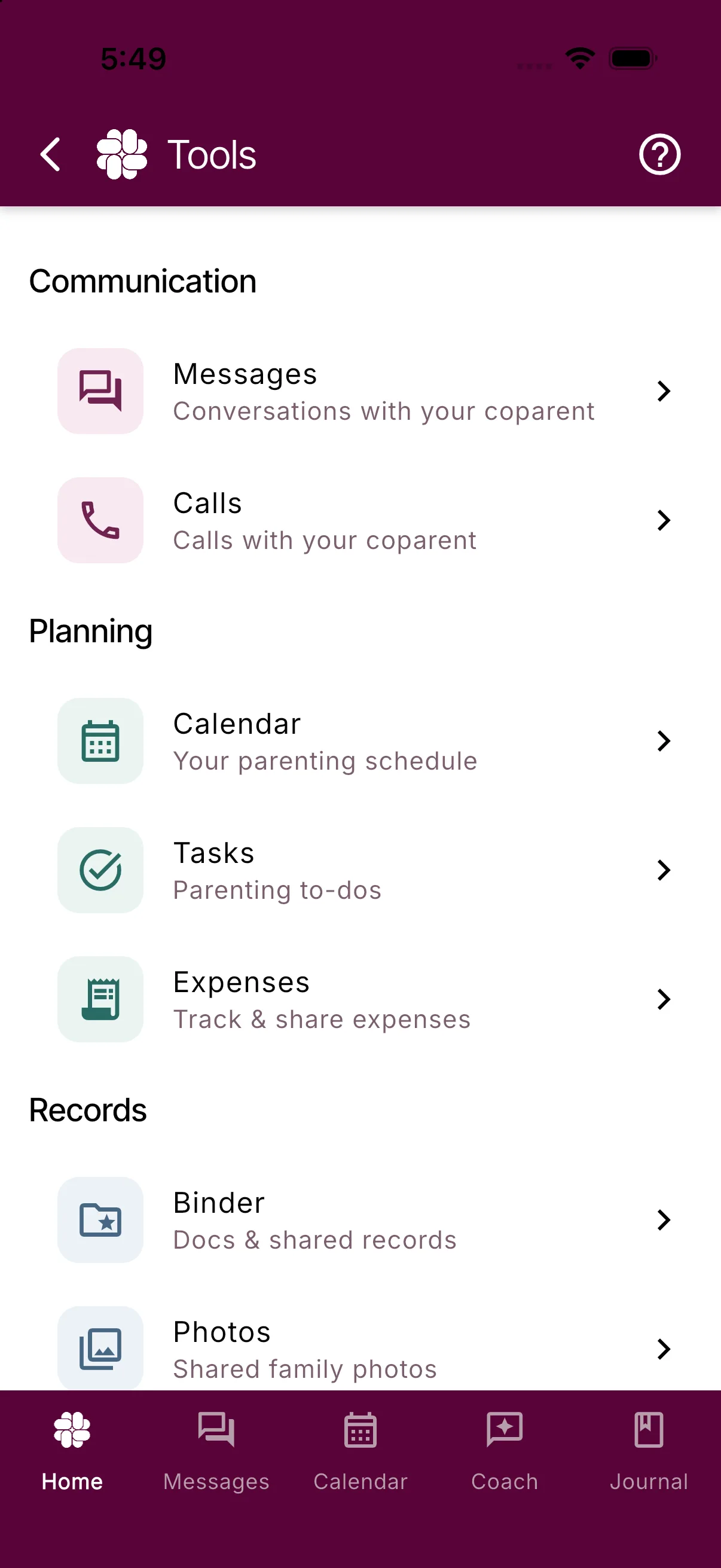
Communication
- Messages: your conversation with your coparent, with Tone Guardian review on the way out and Message Shield filtering on the way in. See Viewing and sending messages, Tone Guardian settings, and Message Shield.
- Calls: your call history and calling options. Shown in Collaborative Mode or when you have a Boundary Line number. See Calling features and Video calling options.
Planning
- Calendar: your parenting schedule, custody calendar, and schedule change requests. See Custody and parenting plan setup and Custody calendar settings.
- Tasks: shared and private to-do lists. See How to use Tasks and To-dos.
- Expenses: track and split child-related costs. See Shared expenses and Disputed transactions.
Records
- Binder: important child and household information, documents, and shared files. See How to use the Custody Binder and Uploading your parenting plan.
- Photos: every image shared in your messages, in one gallery. See How to use the image gallery.
- Reports: PDF reports and CSV exports for messages, calendar, calls, journal, tasks, and expenses, plus a Coparenting History PDF. See Reports and Exports Overview.
Reflect & Grow
- Coach: private AI coparenting guidance that your coparent never sees. See How to use Coparent Coach.
- Journal: your private, time-stamped record with photos and location. See How to use the Coparenting Journal and How to export my journal entries.
- Stats: your coparenting activity over time. See Understand Your Coparenting Story and Stats.
- Your Subscription: your current plan, Restore Purchase, referral codes, and cancellation help. This opens the same Subscriptions screen as Settings > Manage Subscription. See Why isn’t my subscription or upgrade showing?.
Resources
- Coparenting Newsletter: sign up for app updates and coparenting tips.
- Coparenting Podcast, Coparenting Guide, Coparenting Videos, and Coparenting Comic Strip: BestInterest content you can read, watch, or listen to inside the app. See How to use the Coparent Learning Library.
- Professionals Directory: find coparenting professionals.
- Books & Workshops: more coparenting resources.
About BestInterest
Leave Us a Review, The BestInterest Story, Share BestInterest, Find on Instagram, Find on TikTok, and Join Referral Program.
Support
- Contact Support: message the BestInterest support team from inside the app.
- Show Tutorials Again: replay the guided tours for each screen.
- Help Center, FAQs, and Troubleshooting: open the support site inside the app.
- Help Us Improve and Send a Feature Request: share feedback.
- Join Our Beta Program: try new features early. This option is hidden once you are a beta tester.
Settings
The Settings button is at the bottom of the More Tools screen. It also sits below the dashboard tools on Home. See Where to find every setting in BestInterest.
Frequently asked questions
How do I open the More Tools screen?
On Home, scroll below your dashboard tools and tap More Tools. Every tool, resource, and support option is listed there.
Why don't I see Calls under Communication?
Calls appears when you are in Collaborative Mode or have a Boundary Line number. Solo Mode without Boundary Line has no calling.
Where are Subscriptions?
Tap Your Subscription under Reflect & Grow on the More Tools screen, or open Settings > Manage Subscription.
How do I replay the in-app tutorials?
Open More Tools and tap Show Tutorials Again under Support.
Was this helpful?
Still need help?
Contact Support