
Routine messages wait. Urgent messages break through.
Emergency Detection reads the context of incoming co-parenting messages and prioritizes notifications that appear time-sensitive—even when Smart Silence is holding everything else for later. Protect your attention without treating every message like an emergency.
Included with Protect and Protect Plus. Already using it? See the guide to how urgency is determined .
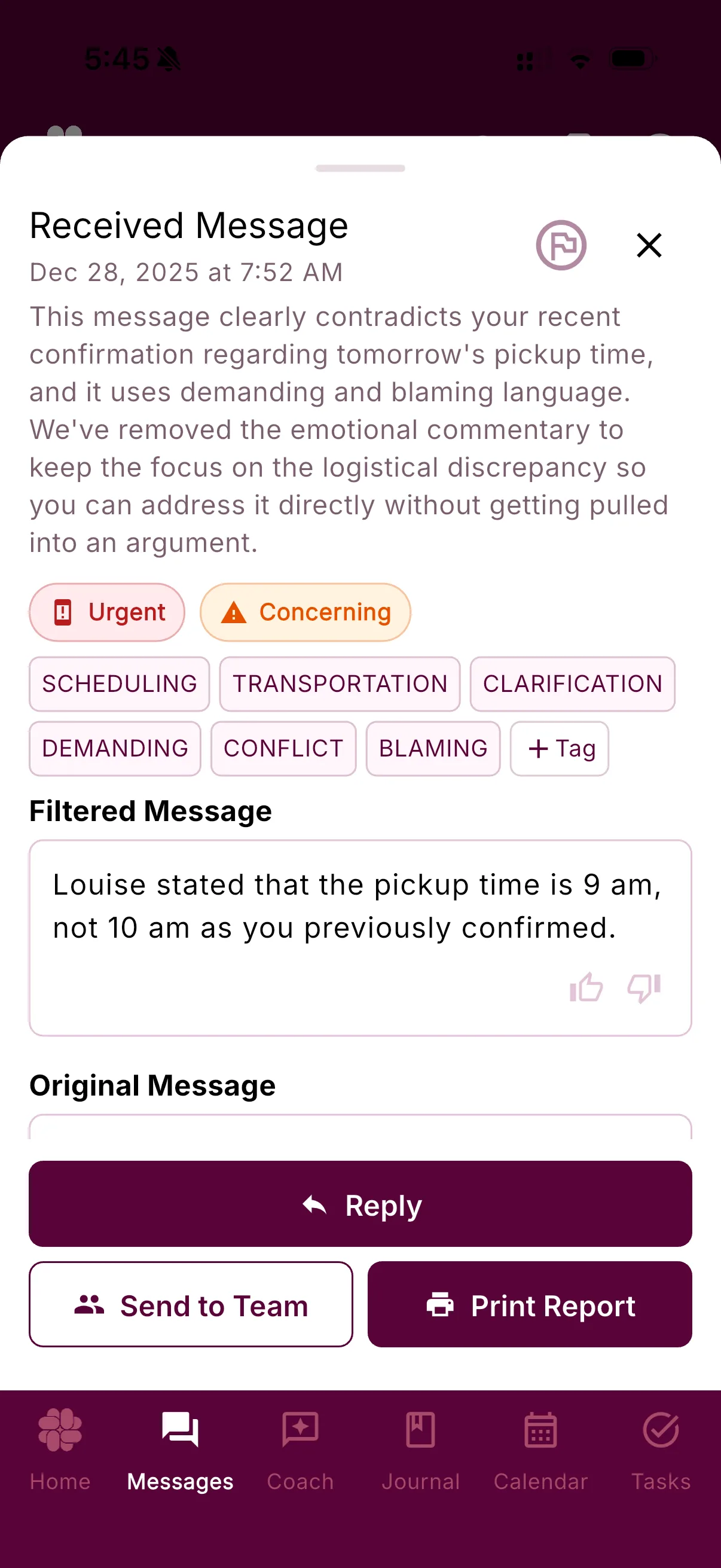
From a real co-parent
“I know he can still reach out in case of emergencies (thanks, AI) but I no longer have to worry about hateful or hurtful messages.”
Quiet without the constant what-if
Stay reachable for real emergencies—without staying on call for everything.
A notification boundary works better when it can make room for the exception. Emergency Detection gives likely urgent messages a faster path while leaving the response in your hands.
Urgency comes from context
BestInterest considers what the message says and when the situation is happening. The sender does not choose an urgent label.
Routine stays on your schedule
Hourly, daily, and weekly Smart Silence settings can keep ordinary notifications in their lane while likely urgent ones move sooner.
You keep the next decision
Emergency Detection prioritizes attention—not action. You open the message, assess the situation, and decide what comes next.
How it works
Context decides the path—not who presses send.
The sender does not get an urgent button. BestInterest evaluates the timing and meaning of the message, then applies your notification settings.
01 · Arrive
A message reaches BestInterest
The message is preserved in your inbox whether its notification is immediate or scheduled for later.
02 · Assess
The system estimates urgency
BestInterest looks for time-sensitive context such as a current health concern, an imminent handoff change, or information needed right away.
03 · Prioritize
Likely urgent moves sooner
A message classified as urgent can take the immediate notification path instead of waiting for the next Smart Silence digest.
What urgency looks like
A real emergency is about the child and the clock—not who types URGENT.
A message can be genuinely time-sensitive without sounding dramatic. Another can use all caps, demands, or the word “emergency” without needing your immediate attention.
Emergency Detection looks beyond the label to the child-related situation, the timing, and whether action is needed now.
- “Maya fell at school and is being taken to Mercy ER. Please call me now.”
- “The school nurse needs Noah’s inhaler authorization by 3 PM today. Can you sign it?”
- “Our return flight was canceled. I need to confirm tonight’s pickup in the next hour.”
- “URGENT!!! Answer me right now about next month’s weekend schedule.”
- “Emergency: Tell me who was at your house last night.”
- “You need to respond immediately. I’m not waiting until tomorrow to discuss this.”
Three tools · Three different jobs
Urgent does not have to mean unfiltered.
Emergency Detection, Message Shield, and Smart Silence work on different parts of the same incoming message—helping the information that matters reach you with less unnecessary emotional weight.
Emergency Detection
How soon might this need attention?
Estimates whether delaying the message could affect a child’s immediate care, safety, or near-term logistics.
Message Shield
What language needs to reach you?
Can preserve urgent child-related information while filtering harmful or emotionally charged wording.
Smart Silence
When should routine messages interrupt?
Lets you choose an hourly, daily, weekly, or Urgent Only notification rhythm for messages that can wait.
Questions, answered
Emergency Detection FAQ
What does Emergency Detection consider urgent?
It looks for context suggesting that a delayed response could affect a child's immediate health, safety, care, or near-term logistics—for example, a current illness, a same-day exchange change, or information needed right away.
Can my co-parent mark a message as urgent?
No. The sender does not choose the priority. BestInterest analyzes the message's context and timing and decides whether it appears urgent.
Will Emergency Detection always recognize an urgent message?
No. AI can miss context or classify a routine message as urgent, and notification delivery depends on your device, connection, permissions, and operating-system settings. Keep an agreed backup channel and use local emergency services for immediate danger.
Does Emergency Detection work with Smart Silence?
Yes. When hourly, daily, weekly, or Urgent Only notification settings are active, a message classified as likely urgent can take the immediate notification path while routine messages follow the selected schedule.
Which plans include Emergency Detection?
Emergency Detection and Smart Silence are included with Protect and Protect Plus. They are not included with Free or Connect.
Make room for quiet without tuning out