
Your co-parent can message. Your day doesn’t have to stop.
Smart Silence lets you choose when routine co-parenting notifications reach you—hourly, daily, weekly, or only when a message appears urgent. Stay informed without staying on call.
Included with Protect and Protect Plus. Already using it? See the notification settings guide.
From a real co-parent
“I used to dread the sound of my phone going off. Now, thanks to BestInterest, I feel a sense of calm. The app has given me back control over how often my ex can contact me.”
A boundary that belongs to you
They can send the message. You decide when it gets your attention.
A communication boundary should not depend on your co-parent changing their habits. Smart Silence is your private setting: it gives routine notifications a predictable rhythm while keeping the underlying messages available in BestInterest.
Routine messages can wait
Choose an hourly, daily, or weekly rhythm instead of letting every non-urgent message interrupt the moment you are in.
Likely urgent messages can surface
Emergency Detection can prioritize a message that appears time-sensitive while routine notifications stay on your schedule.
Nothing disappears
Smart Silence changes the notification cadence, not your inbox. Every message remains available whenever you choose to check.
How it works
Routine messages follow your rhythm. Likely urgent ones move faster.
Every message reaches your inbox. Smart Silence changes when your phone asks for your attention.
01 · Receive
A message arrives
The message is delivered to your BestInterest inbox whether or not a notification appears right away.
02 · Assess
BestInterest estimates urgency
Emergency Detection reviews the context to identify messages that may need attention before your next scheduled digest.
03 · Notify
Your rhythm takes over
Routine messages follow your chosen cadence, while a message classified as likely urgent can notify you sooner.
Five levels of quiet
Choose the cadence that fits this season of your life.
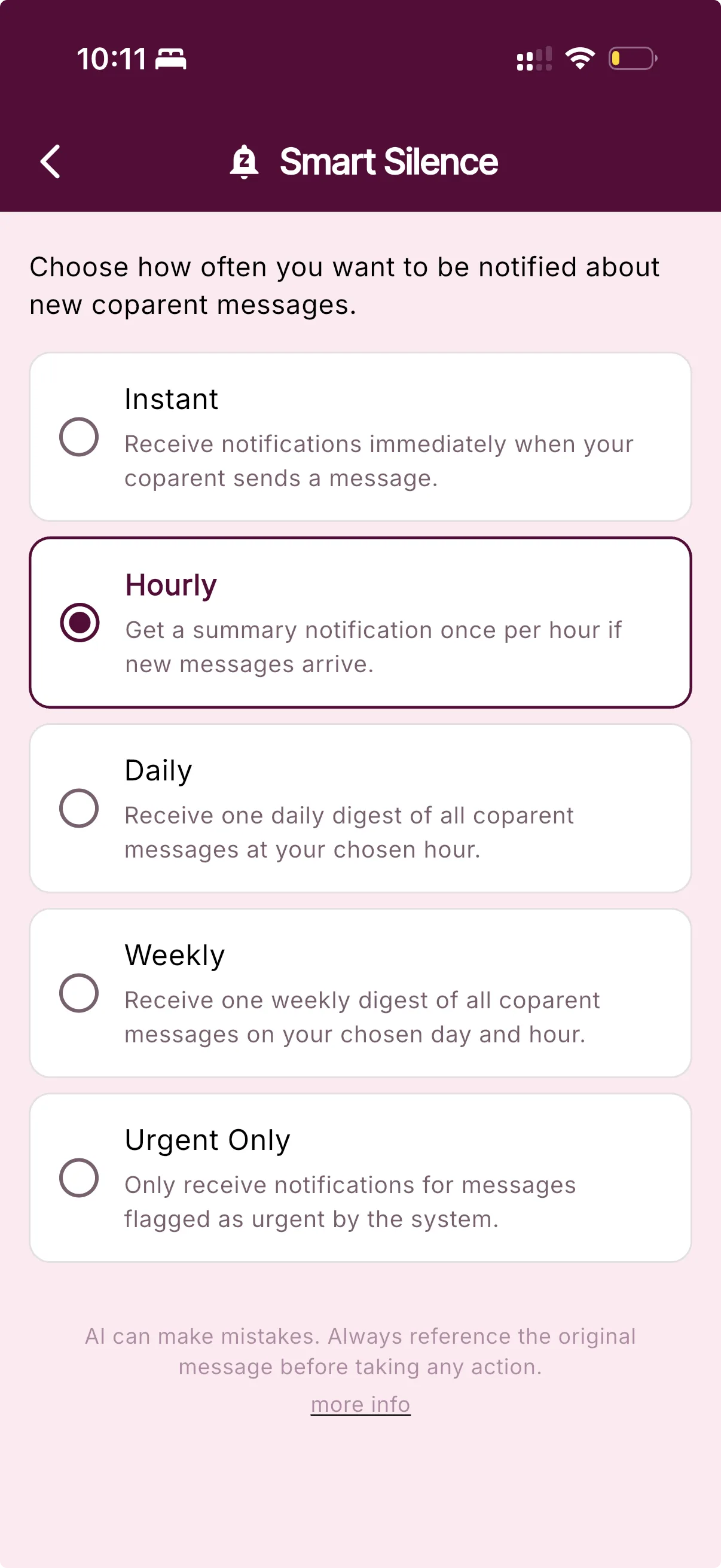
Keep instant alerts, batch them by hour, choose one daily or weekly digest, or receive notifications only when a message is flagged as urgent. You can change your selection whenever you need to.
Daily and weekly schedules let you choose the delivery time. If you open BestInterest and read a message first, you will not receive a later reminder about something you already saw.
Instant
Let each new co-parent message notify you as it arrives.
Hourly
Receive one summary after routine messages collect for up to an hour.
Daily
Choose an hour for one daily reminder about unread messages.
Weekly
Choose a day and time for one weekly reminder about unread messages.
Urgent Only
Keep routine notifications quiet and receive alerts only for messages flagged as urgent.
Questions, answered
Smart Silence FAQ
What does Smart Silence do?
Smart Silence changes when BestInterest notifies you about new co-parent messages. Routine messages can follow an hourly, daily, or weekly schedule, while every message remains available in your inbox.
Which Smart Silence notification schedules can I choose?
You can keep instant notifications, receive an hourly summary, choose a daily digest time, choose a weekly day and time, or receive notifications only for messages the system flags as urgent.
Can an urgent message notify me before my scheduled digest?
Yes. Emergency Detection can prioritize a message classified as likely urgent while hourly, daily, or weekly batching is active. AI can misclassify urgency, and notification delivery still depends on your device and connection.
Does Smart Silence hide or delete messages?
No. Smart Silence changes notification timing only. Messages remain in BestInterest, and you can open the app to check them whenever you choose.
Which BestInterest plans include Smart Silence?
Smart Silence and Emergency Detection are included on Protect and Protect Plus. They are not included on Free or Connect.
Put notifications back in their place