
Stop dreading the ding.
Message Shield puts a protective buffer between you and high-conflict messages. It filters harmful language before you see it, so you get the information you need—with less emotional weight to carry and more peace left in your day.
Included with Protect and Protect Plus. Already using it? See the Message Shield settings guide.
Quick answer
How do you stop harassing messages from a co-parent reaching you?
Message Shield, included on BestInterest's Protect and Protect Plus plans, reviews each incoming message before it is presented to you. Content that appears hostile can be restated in neutral, third-person language through Mediator Voice™, and depending on your settings the original wording stays behind a tap-to-reveal prompt so you can read it when you choose. Message Shield also covers texts routed through Boundary Line when you are on Protect or Protect Plus, so it works even if your co-parent never installs the app. The tone features in OurFamilyWizard, TalkingParents, and AppClose warn or suggest changes to the sender before they send — none of them filters what reaches you.
From a real co-parent
“I chose BestInterest over the other apps because it has an incoming message filter. This has made a huge difference to the impact of the high conflict on my mental health.”
More than a message archive
Most apps rely on the courts to reduce conflict. Message Shield gives you peace from day one.
Documentation matters, but so does the way you feel reading a message. Message Shield adds a layer of protection between your co-parent’s original wording and what you actually see, without altering the underlying record.
How it works
The useful part comes forward first.
Message Shield keeps only what is child focused, so you can stay present with your kids.
01 · Receive
A message arrives
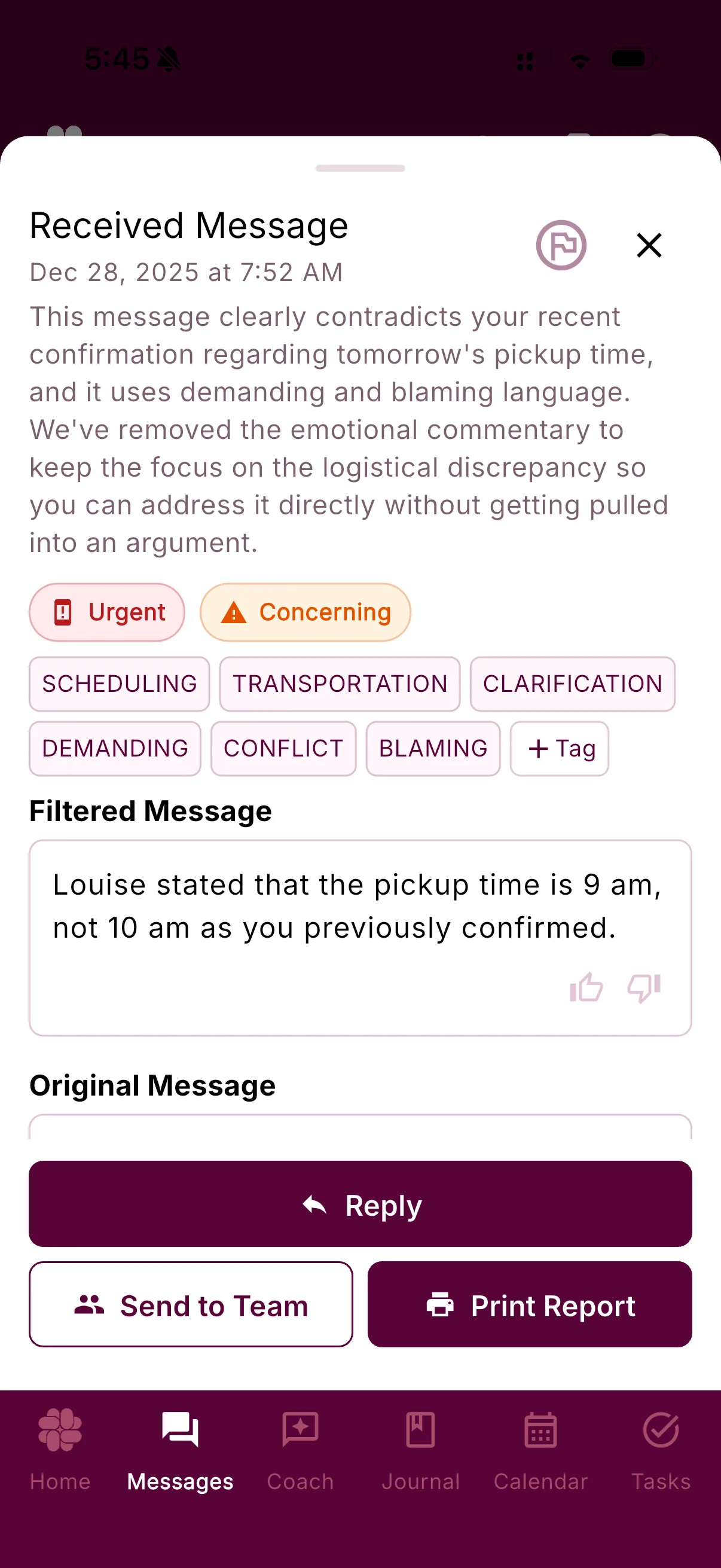
Message Shield removes any hostility, personal attacks, manipulation, and non-child-focused content, and retains the original for safe keeping.
02 · Review
You see the filtered message
The child-focused message is presented first, allowing you to take proper co-parenting action, without getting sucked into the conflict.
03 · Choose
You decide what to see
Review the original message when you're feeling more resourced, or you're with your therapist or attorney, the choice is yours.
Inside the app
The details are there when you want them.
Every message is reviewed in the context of the messages that came before it and your parenting plan, along with helpful advice from Coparent Coach.
The original message your coparent sent is just a tap away, and can be sent to your attorney, therapist, or other professional before even viewing it.
If needed, a court-ready report of the original message is just a tap away.
No app on their phone? No problem.
Works even if your co-parent won't use a co-parenting app.
Pair Message Shield with Boundary Line — a dedicated BestInterest number your co-parent texts and calls like normal, with nothing to download or agree to. We filter their ordinary texts before you read them, and everything stays documented.
When the conversation comes by email
Message Shield protects your peace there, too.
With Message Shield for Email, forward incoming coparent email into your private BestInterest timeline and read it with harmful language filtered. Your coparent keeps using their usual email, the original remains available, and imported email stays private to you. Included with Protect and Protect Plus.
Organized for later
Magic Tags help you find the moment
Messages reviewed by Message Shield will be tagged with relevant topics like scheduling, transportation, school, or expenses. Later, those tags give you another way back to related conversations without remembering the exact wording.
Mediator Voice™
Like a supportive partner, reviewing every message.
Mediator Voice™ restates your coparent's message in neutral, third-person language. That distance can make it easier to respond to the child-related information rather than the emotional charge around it.
From a real co-parent
“Your service has saved me. All of his abusive messages and false accusations—trying to trigger a response from me—were wearing me down. Now, I no longer need to read them in case there is some morsel of co-parenting info. My nervous system can finally start to heal. Thank you.”
Questions, answered
Message Shield FAQ
What does Message Shield do with a concerning co-parent message?
Message Shield analyzes incoming messages before presentation and can restate concerning content in neutral, third-person language through Mediator Voice. Depending on your settings, the original wording may stay behind a tap-to-reveal prompt.
Can Message Shield or Mediator Voice be disabled?
Yes. Go to Settings, then Emotional Safety, then Message Shield. You can turn Message Shield off completely, or keep Message Shield on and turn Mediator Voice off separately. With Message Shield off, incoming messages appear in their original form. With only Mediator Voice off, Message Shield stays active without the neutral, third-person restatement.
Which BestInterest plans include Message Shield?
Message Shield is included on Protect and Protect Plus. It is not included on Free or Connect. Boundary Line starts on Connect, but Boundary Line messages receive Message Shield filtering only when the BestInterest user has Protect or Protect Plus.
Does Message Shield work if my co-parent does not use BestInterest?
Yes, when you use Boundary Line on Protect or Protect Plus. Your co-parent can text the Boundary Line number from their regular phone, and the incoming message routes through BestInterest.
Can Message Shield make mistakes?
Yes. AI can miss context, flag an appropriate message, or produce an imperfect restatement. You remain in control of the settings and can review the original message.
Can filtered messages be used in court or mediation?
BestInterest can export supported records for professional or legal review. Message Shield does not determine admissibility or evidentiary weight, and its restatement should not replace the original message when exact wording matters.
Read messages on your terms