
Shared child expenses, without the constant back-and-forth.
Log child-related costs, calculate each parent’s share, record reimbursements, and see the running balance in one organized ledger—so money questions take less time and mental energy.
Core expense tracking and CSV export are included on the Free plan.
Clarity without the chase
One place for the money questions that keep coming back.
Remembering who paid, finding the receipt, recalculating the split, and checking whether a payment arrived is real work. Expense Tracking gives that work a clear home.
Stop rebuilding the history
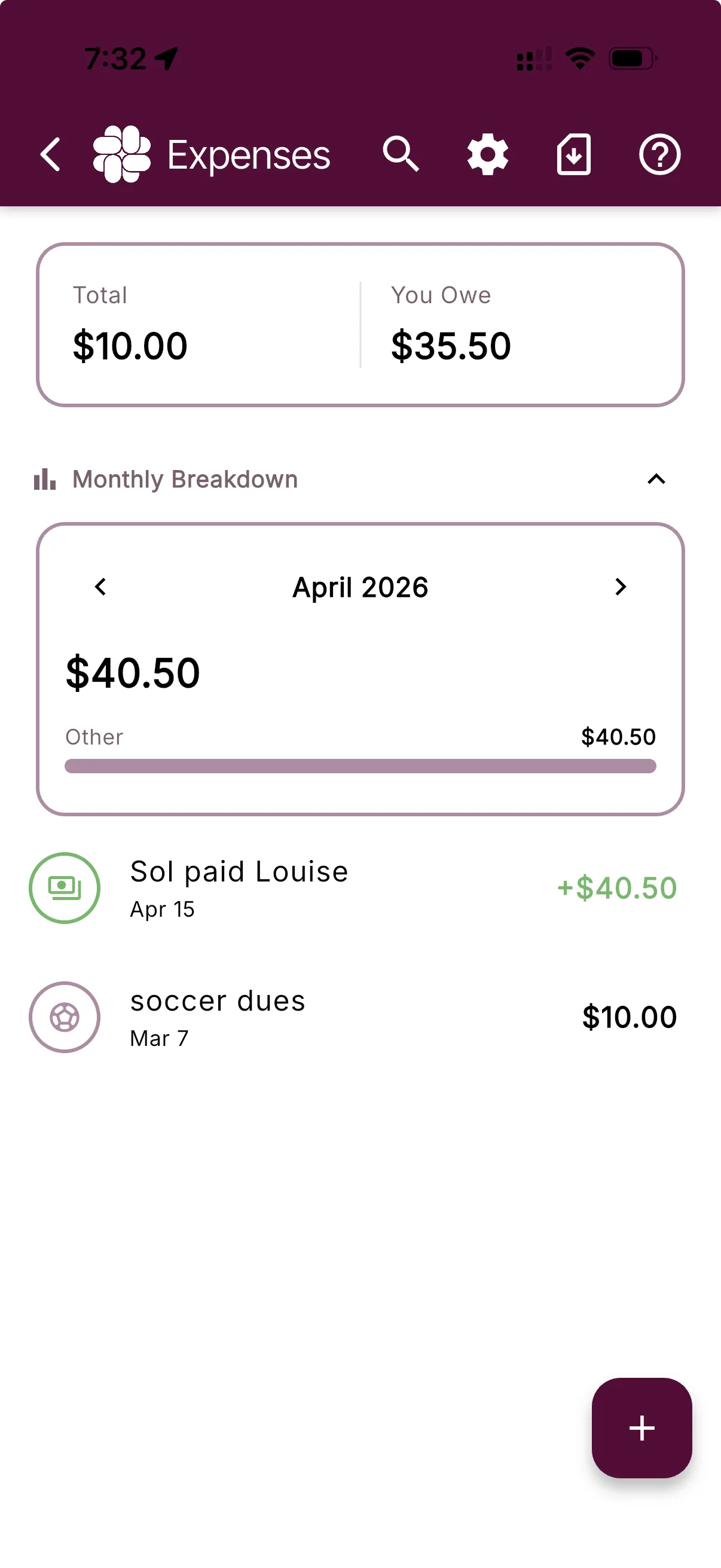
Keep the amount, date, category, payer, and each parent’s share together instead of piecing the story back together from texts and receipts.
Let the split stay visible
BestInterest calculates each parent’s portion from your family’s default split, so the math stays attached to the expense that created it.
See when money moves back
Record payments and reimbursements in the same ledger so the running balance reflects more than a list of what was spent.
How it works
Add the cost. See the share. Keep the balance current.
Each step stays attached to one organized record, from the original expense through reimbursement.
01 · Log
Add the child-related cost
Enter the amount, date, payer, description, and category while the details are still easy to remember.
02 · Split
See each parent’s portion
Start from your family’s configured percentage and review the share for this specific expense.
03 · Reconcile
Record the reimbursement
Log a payment when money changes hands and keep the current balance connected to the underlying costs.
The full picture
A running balance with the details behind it.
A single total is only useful when you can understand where it came from. BestInterest keeps expenses and reimbursements visible beneath the balance, with disputed items called out separately.
Use Collaborative Mode for a shared family ledger, or keep your own organized history in Solo Mode when your coparent does not use BestInterest.
Soccer registration
Total $180.00 · Your share 50%
Reimbursement recorded
Payment stays with the shared history
Useful from day one
Start free. Add time-saving tools when you need them.
The core ledger is available without a paid plan. Connect, Protect, and Protect Plus add receipt tools and automatic recurring expenses.
Included on Free
The full organizing foundation
Log and categorize expenses, calculate shares, track balances, record reimbursements, and export your expense history as a CSV.
Connect and higher
Less manual follow-through
Upload and scan receipts, then create recurring expenses for predictable costs such as childcare, tuition, or activities.
Questions, answered
Expense Tracking FAQ
Is expense tracking included on the Free plan?
Yes. The Free plan includes logging expenses, calculating each parent's share, tracking balances, recording reimbursements, and exporting expense records as a CSV. Connect and higher plans add receipt uploads, receipt scanning, and recurring expenses.
Do both parents need BestInterest to track expenses?
No. Collaborative Mode gives both parents a shared expense ledger. In Solo Mode, you can keep your own expense records even if your co-parent does not join BestInterest.
How are shared costs calculated?
BestInterest uses the default expense split configured for your family to calculate each parent's portion, such as 50/50 or 60/40. Review the split and each expense against your current agreement.
Can I attach receipts?
Receipt uploads and receipt scanning are available on Connect, Protect, and Protect Plus. The core expense tracker does not require a paid plan.
What expense records can I export?
CSV expense export is included on the Free plan. Verified PDF expense reports are available on Connect and higher plans, and every report can include an optional Certificate of Authenticity. Exports organize the information recorded in BestInterest; they do not guarantee accuracy, admissibility, reimbursement, or a particular legal outcome.
Give shared costs a clear home