
Can my coparent's message appear in the notification?
Yes. By default a new-message alert keeps the text out, but one switch puts message content into your lock screen and email alerts.
What the alert says by default
A standard push notification reads New message from coparent with the body A new message is available. When BestInterest flags a message as urgent, the title changes to Urgent message from coparent. Either way, you open the app to read the words.
Turn on Show Message in Alert
- Open Settings > Message Notifications. The screen is titled Notifications.
- Under NOTIFICATIONS, turn on Show Message in Alert (its caption reads Display filtered message in notifications).
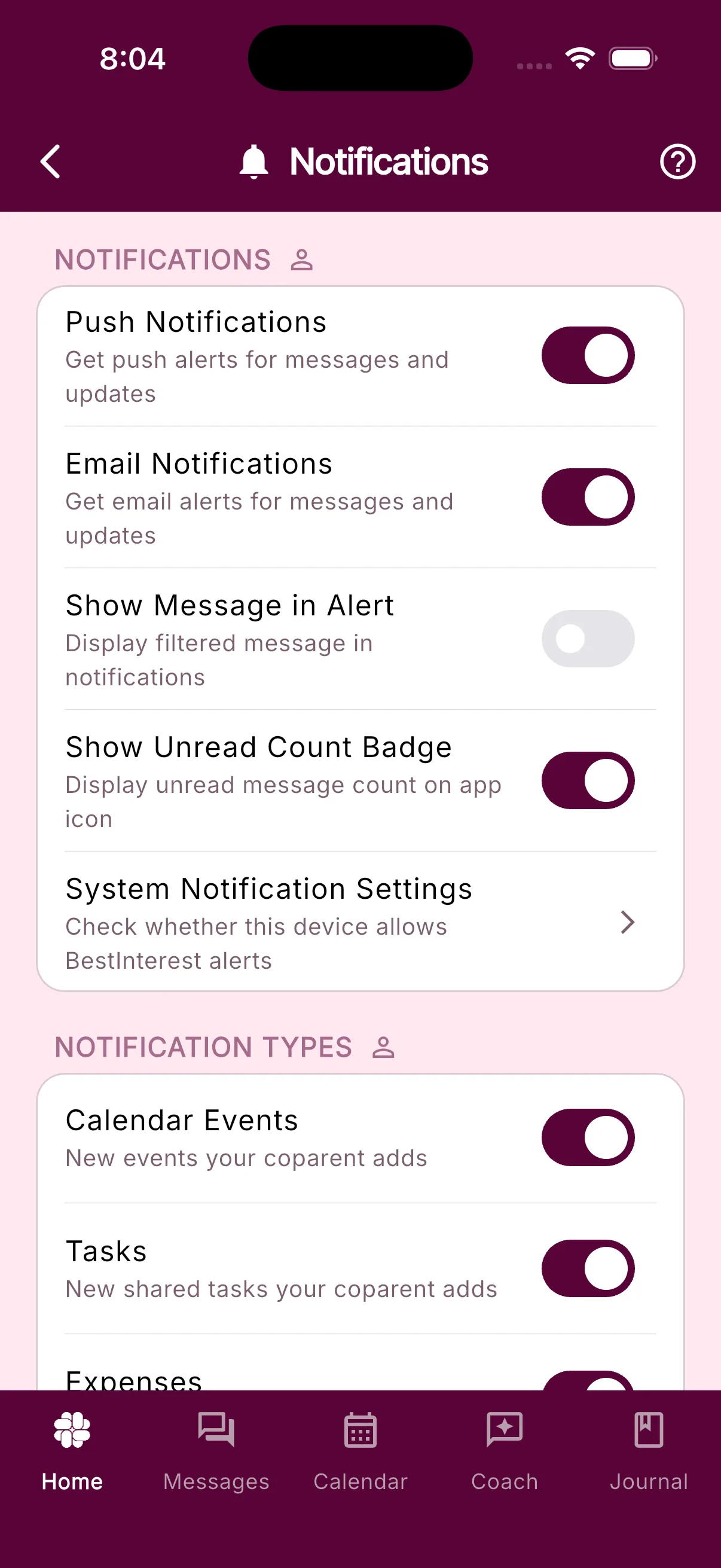
The switch is always on the screen, whatever your plan and whatever your notification frequency. It only matters while Push Notifications or Email Notifications is on; with both off, nothing is sent for it to change.
For the rest of this screen, including sounds, per-device delivery, and notification types, see Message notification options. If you cannot find Settings, see Where to find Settings.
Which message text appears
BestInterest normally uses the message text prepared for display after Message Shield has reviewed it. If that display text is unavailable, the notification service can fall back to the original message. Leave Show Message in Alert off if you do not want message content on your lock screen or in notification email. You can still open the message in the Messages tab and expand Original Message, as described in How to read and send messages.
A few system notices that quote your coparent, such as an expense flagged for discussion or a Binder change, also hold back the quoted text until you turn the switch on.
Digests and email
The switch shapes every kind of message alert:
- Instant delivery: the alert body is the message text selected for the notification, with the fallback described above.
- Hourly, Daily, or Weekly digests (chosen under SMART SILENCE on the same screen, Protect and higher): the body is the newest unread message, followed by a count such as (and 2 more messages). With the switch off, a digest reads You have 3 unread messages from your coparent’s name.
- Email Notifications: the email includes a line that starts Here is [name]‘s filtered message, followed by the text selected for the notification. With the switch off, the email repeats the generic wording.
Your phone’s own lock-screen preview setting still applies on top of this. If iOS or Android is set to hide previews, the text stays hidden until you unlock.
Frequently asked questions
What does a BestInterest message notification say by default?
The title is New message from coparent and the body is A new message is available. An urgent message uses Urgent message from coparent instead. The text of the message stays out until you turn on Show Message in Alert.
Does the notification show the original message or the filtered one?
BestInterest normally uses the message text prepared for display after Message Shield runs. If that display text is unavailable, the notification can fall back to the original message. Leave Show Message in Alert off if you do not want message content in notifications or email.
I use Smart Silence digests. Will the message text appear in those?
Yes. With Show Message in Alert on, an Hourly, Daily, or Weekly digest shows the newest unread message followed by a count of the others, for example (and 2 more messages). With it off, the digest reads You have 3 unread messages from your coparent.
Was this helpful?
Still need help?
Contact Support