
Give every parenting to-do a clear next step.
School forms. Soccer cleats. The appointment someone needs to book. BestInterest Tasks gives every parenting to-do one place to land—with a due date, a clear owner, and a visible finish line. Share what needs coordination or keep it private, so less depends on memory and follow-up messages.
Core shared and private tasks are included on Free.
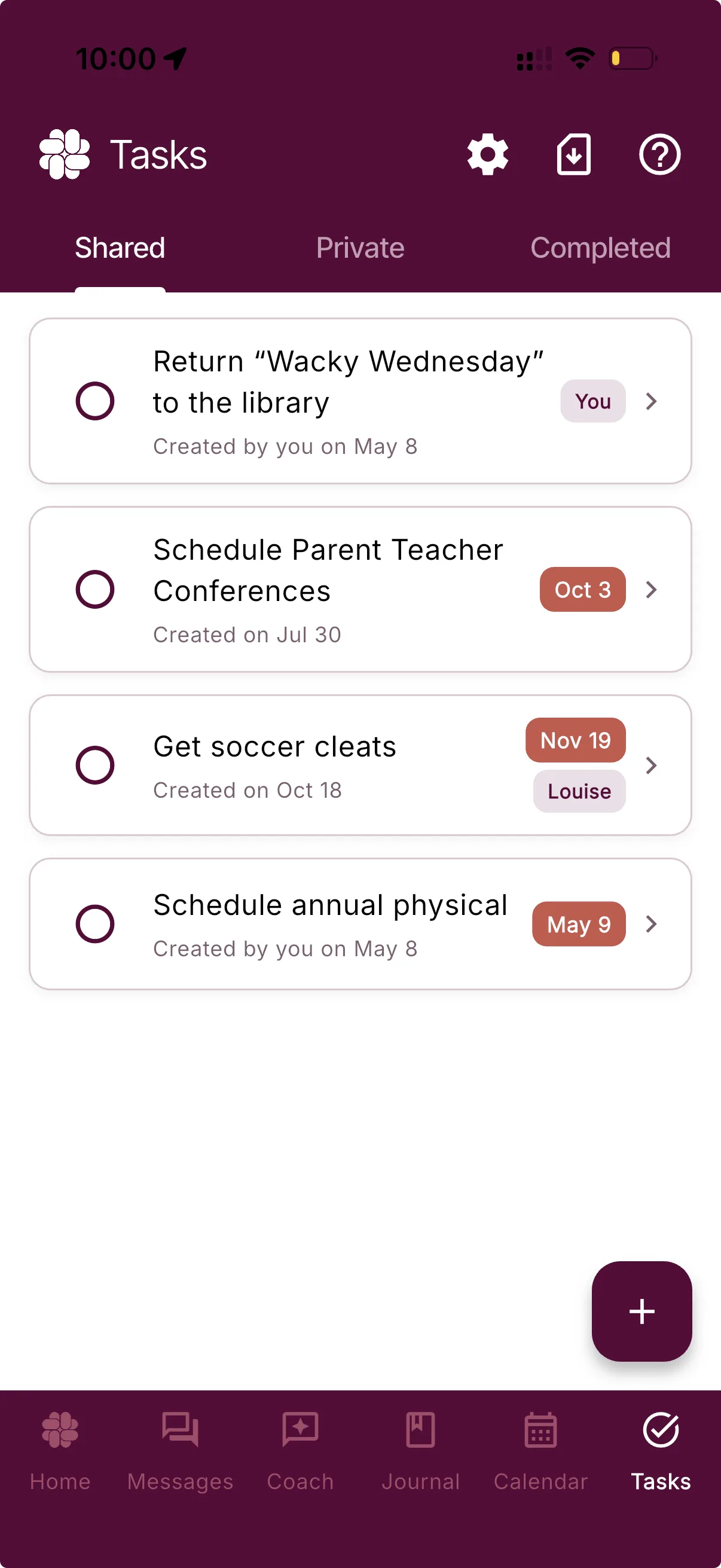
A calmer way to coordinate
Fewer dropped handoffs. Less chasing. More room to parent.
A clear task list replaces some of the guesswork with one shared view of what comes next—and gives personal reminders a private home when they do not need to involve anyone else.
Get it out of your head
Give school forms, supplies, appointments, and exchange details one place to land before the next step gets lost.
Know who owns the next step
Assign a shared task to yourself or your coparent, or leave it unassigned until responsibility is clear.
See what is done
Due dates and a Completed tab make status visible without another round of “Did this happen?” messages.
Shared when it helps
Share what needs coordination. Keep the rest private.
In Collaborative Mode, put family responsibilities on the Shared list so timing, ownership, and completion are visible to both parents.
Choose Private when the reminder is only for you. In Solo Mode, Tasks gives your own parenting to-dos a home even when your coparent does not use BestInterest.
Collaborative Mode
Shared
Due tomorrow
Due Oct 24
Your list
Private
Due Friday
A simple rhythm
What. When. Who. Done.
Tasks keeps the useful parts of coordination together without turning a small to-do into a long conversation.
Name the next step
Turn a loose detail into one specific task while it is still clear.
Add a due date
Put the timing where both parents can find it instead of inside a message thread.
Make ownership visible
Assign a shared task to either parent, or leave it open when the owner is not decided yet.
Close the loop
Mark it complete, review it later, or reopen it if the task still needs attention.
Useful before anyone pays
The core task list is free.
Use shared tasks in Collaborative Mode or keep personal parenting tasks private. Due dates, assignments, completion status, and supported shared task exports are available on Free.
That means you can make the next handoff clearer without first deciding whether another subscription belongs on your own to-do list.
Included on
Free
- Shared family tasks in Collaborative Mode
- Private tasks in Collaborative or Solo Mode
- Optional due dates and shared-task assignments
- Completed task history
- CSV export for supported shared task records
Questions, answered
Tasks & To-Dos FAQ
Are Tasks & To-Dos included on the Free plan?
Yes. Core shared and private tasks are included on Free, along with task export for supported shared task records. You can use private tasks in Solo Mode or shared and private tasks in Collaborative Mode.
Can I keep a task private?
Yes. Choose Private when you create a task in Collaborative Mode, or use private tasks in Solo Mode. Private tasks stay in your own task list and are not shown to your coparent.
Can I assign a task to my coparent?
In Collaborative Mode, a shared task can be assigned to you, assigned to your coparent, or left unassigned. Private tasks do not have an assignee.
Will my coparent be notified when I add a shared task?
BestInterest can add a system message when a new shared task is created. Each parent can control new-task system-message notifications in Task settings.
Can I create recurring tasks?
Tasks currently support individual due dates, not an automatic recurring-task schedule. Create a new task when a responsibility repeats.
Do tasks appear in the Shared Calendar?
No. A task and a calendar event are separate. Add an event to the Shared Calendar when both parents need to see a scheduled date and time.
Can I export task history?
Yes. Task export is available on Free for supported shared task records. Private tasks are not included in the family task export.
What happens when I mark a task complete?
The task moves to the Completed tab, where you can still review it. If the task needs more work, you can reopen it by marking it incomplete.
Less to keep in your head