
More confidence before you tap send.
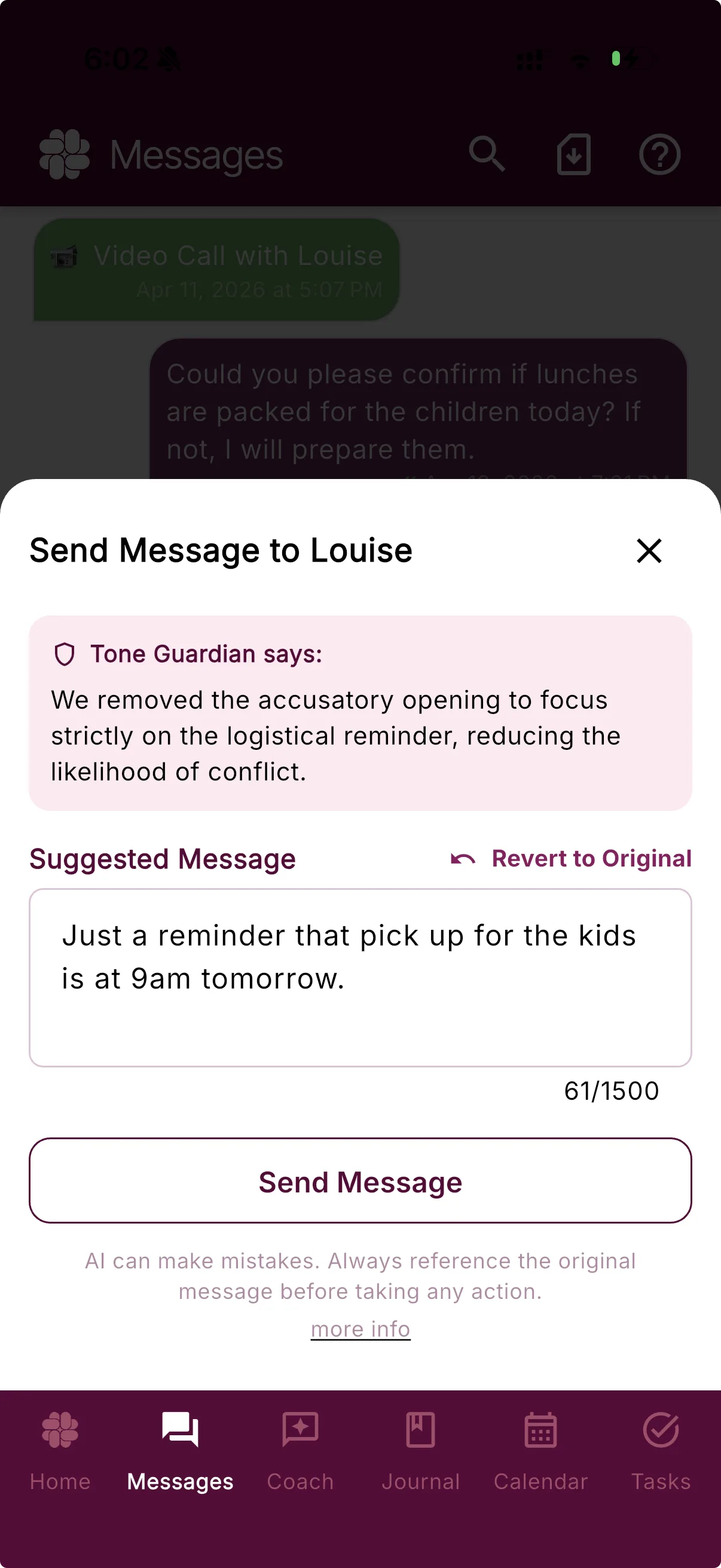
We all make mistakes sometimes. Tone Guardian is there to review every message for clarity and conflict reduction. When it sees room to reduce conflict, it offers a calmer, clearer rewrite—while you keep the final say.
Included with Protect and Protect Plus. Already using it? See the Tone Guardian settings guide.
From a real co-parent
“I'm thankful for the app it's very good and life-changing in my opinion. It eliminates the stress of painful communication, I'm able to feel at peace when responding because of the filter and communication tips”
A pause that works for you
The moment before send is where a different exchange can begin.
Tone Guardian steps in before an outgoing message is delivered—not after the exchange has already escalated. It gives you another way to say what matters without taking your voice or judgment out of the process.
Reviews before it's sent
Tone Guardian checks your outgoing message before you send it, giving you a chance to refine your message before it’s sent.
Explains the suggestion
You see why a phrase may add conflict alongside an editable alternative that keeps the practical point in focus.
Keeps you in charge
Use the suggestion, change it, return to your original, or close the review. Tone Guardian never makes the final decision for you, and an unsent draft is not added to your co-parenting message record.
How it works
Draft. Review. Decide.
Guidance arrives at the useful moment, and the final message remains yours.
01 · Draft
Write what you need to say
Start in your own words. Tone Guardian works from the message you intended to send and the available conversation context.
02 · Review
Get a calmer option
When the draft could be clearer or less likely to escalate, Tone Guardian explains the concern and offers an editable rewrite.
03 · Decide
Choose the final message
Send the suggestion, revise it, keep your original, or step away. The words that leave the app are still your choice.
Examples of calmer reframing
What a suggested rewrite actually looks like.
These are examples, not guaranteed outputs. The most appropriate wording depends on your situation.
Frustration
“You’re late again. This is ridiculous.”
Suggested: “Pickup was later than scheduled today. Can we confirm the time for the next exchange?”
Disagreement
“That’s not true. You’re the one who never follows through.”
Suggested: “We remember this differently. Can we review what was agreed to in writing?”
Sarcasm
“Sure, because that worked so well last time.”
Suggested: “I don’t think that approach worked last time. Would you be open to another option?”
A clearer place to start
Keep the practical point. Leave less room for escalation.
A hard moment can put the accusation before the information. Tone Guardian can bring the logistical point forward and offer language that is easier to act on.
Original draft
“If you actually cared about Jade’s homework, you’d remember her project is due tomorrow.”
Tone Guardian suggestion
“Jade’s project is due tomorrow. Have you had a chance to review her progress?”
Illustrative example; actual suggestions depend on context.
More than a tone meter
A tone meter flags your wording. Tone Guardian hands you the calmer version.
Some co-parenting apps stop at warning the sender that a message sounds hostile. Tone Guardian explains what may escalate the exchange and drafts an optional, editable rewrite — so the calmer message is one tap away instead of a rewrite you have to produce yourself.
Communication styles
Choose the kind of support that fits the exchange.
Your personal Tone Guardian settings can shape the kind of guidance you receive. Change styles whenever your needs change, or turn the review step off.
Default
Clear, respectful, and still your voice
Balanced coaching focuses on clarity, tone, and child-related communication.
Grey Rock
Brief, factual, and low engagement
Suggestions prioritize minimal engagement when that communication style fits your situation.
Questions, answered
Tone Guardian FAQ
What does Tone Guardian do?
Tone Guardian reviews eligible outgoing co-parenting drafts before delivery. It can explain language that may escalate the exchange and offer an editable suggestion that is calmer, clearer, or more focused on the practical point.
Does Tone Guardian automatically change or send my message?
No. Tone Guardian presents an optional suggestion. You can send it, edit it, return to your original message, or close the review without sending. You remain in control of the final wording.
Which communication styles can I choose?
Default style focuses on clear, respectful communication while preserving your voice. Grey Rock style prioritizes brief, factual, low-engagement wording when that approach is appropriate for your situation.
Can I turn Tone Guardian off?
Yes. Tone Guardian can be turned off in your personal message settings. When it is off, outgoing messages are sent without the Tone Guardian review step.
Which BestInterest plans include Tone Guardian?
Tone Guardian is included on Protect and Protect Plus. It is not included on Free or Connect.
A steadier way to send