
Stop digging through your parenting plan when conflict starts.
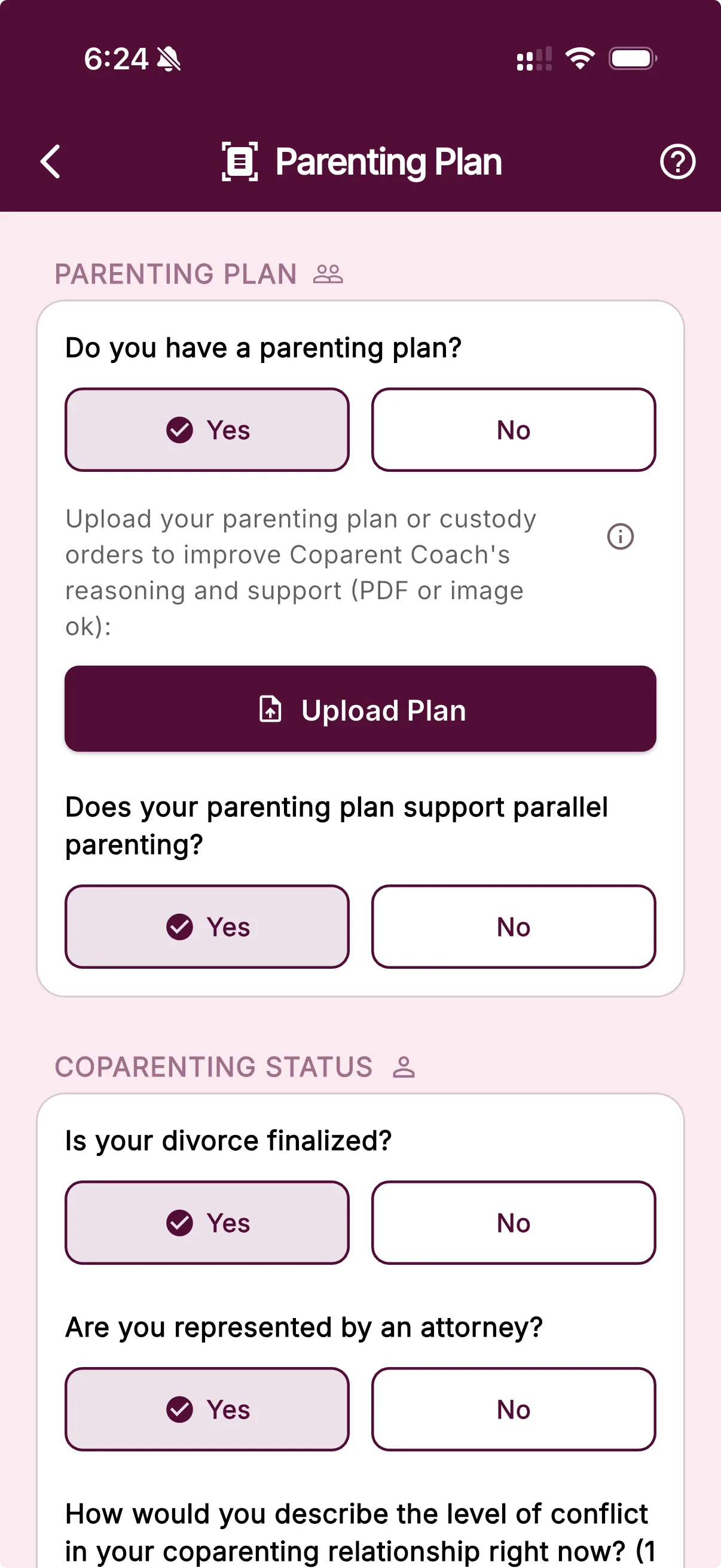
Upload a PDF or clear image once. BestInterest turns it into a plan-aware reference for Coparent Coach, so relevant schedules, boundaries, and terms are easier to bring into the conversation—without replacing the original document or your judgment.
Included with Protect and Protect Plus. The Help Guide explains supported files, visibility, and replacement.
From a real co-parent
“To keep her accountable and to have her not lie about her version of the parenting plan, this app has done it all! Everything is recorded and documented. All reports can be put into a court document.”
The plan, closer at hand
A long document becomes context you can actually use.
Parenting plans often matter most when there is the least time or emotional space to search them. Parenting Plan Review keeps a structured reference near your communication tools while leaving the original document in charge.
Less searching in the hard moment
Keep a reviewed reference close to the same app where you ask for help, instead of reopening a long document every time a question comes up.
More useful context for Coach
Coparent Coach can draw from the active plan summary when a schedule, boundary, expense, or decision-making term is relevant.
One current plan to work from
Replace the file when your agreement changes so the latest reviewed version becomes the active context for future guidance.
How it works
Upload. Review. Bring the plan into the moment.
BestInterest does the organizing; you keep responsibility for checking what the plan says and deciding what to do.
01 · Upload
Choose the plan or order
Add one readable PDF or image from Parenting Plan settings. Court orders and informal parenting agreements are both supported.
02 · Review
BestInterest organizes the provisions
AI reviews the available text into a structured reference for custody, schedules, finances, communication, decisions, and other terms.
03 · Use
Coach can bring in relevant context
When you ask about a co-parenting situation, the active plan reference can help Coach surface details for you to verify against the original.
Built into Coparent Coach
Plan-aware guidance without starting from a blank chat.
A general AI assistant only knows the details you remember to paste. BestInterest can make the active parenting-plan reference available to Coparent Coach alongside the question you bring forward.
Coach can use relevant context to help you find a practical point, think through a boundary, or draft a response. You still verify the term and choose the next step.
Your file
PDF or clear image
AI review
Key provisions organized
Coach context
Relevant details closer to the conversation
AI-generated context; verify every important term.
What the review can organize
The provisions that shape everyday co-parenting.
The available categories depend on what is actually present and readable in your document.
Custody & time
Schedules, exchanges, holidays, and travel
The review can organize recurring parenting time and exceptions described in the uploaded document.
Money
Support, reimbursements, and shared costs
Financial provisions can be summarized as a reference when a related question comes up.
Communication
Channels, timing, and boundaries
Requirements about how parents communicate can become part of the context available to Coach.
Shared decisions
Education, health, safety, and unique terms
The review can organize decision-making language and other provisions that do not fit a standard schedule.
Reference, not replacement
The document stays authoritative. You stay in control.
Parenting Plan Review makes the agreement easier to navigate, but it cannot decide what a provision means for your family.
Check the original
Keep the signed or otherwise authoritative document available and verify any term before you rely on it.
Replace the active plan
Upload a newer version whenever the agreement changes so older context does not keep guiding new questions.
Choose whether to offer a copy
Your upload and review stay private, including in Collaborative Mode. After review, you can offer a connected coparent the reviewed terms. They choose whether to use their own copy; the original file is deleted after review.
Questions, answered
Parenting Plan Review FAQ
What file types can I use for Parenting Plan Review?
You can upload a PDF, PNG, JPG, or JPEG. For a multi-page plan, use one complete PDF or a clear image that keeps every page upright and readable.
What does BestInterest do with my parenting plan?
BestInterest reviews the file into a structured reference covering available custody, schedule, financial, communication, decision-making, and other provisions. Coparent Coach can use that context when it is relevant to your question.
Does BestInterest enforce court orders?
No. BestInterest cannot enforce a court order or determine whether it has been violated. Parenting Plan Review gives Coparent Coach plan-aware context, so when you ask about a situation or use Coach to review a received message or proposed reply, it can help highlight a relevant provision or a possible conflict. You can also ask Coach directly about your plan for quick reference, then verify the answer against the original document.
Does Parenting Plan Review provide legal advice?
No. The review is an AI-generated reference and can miss, omit, or misread a term. Check it against your current original plan and consult a qualified attorney for legal interpretation or advice.
Can my coparent see the uploaded plan?
No. Your upload and review stay private, including in Collaborative Mode. After review, you may offer a connected coparent a copy of the reviewed terms. They choose whether to use their own independent copy; the original PDF or image is not shared and is deleted after review.
Can I replace my parenting plan later?
Yes. If the plan changes, use Replace Your Plan to upload a new version. BestInterest uses the latest reviewed version as the active plan context.
What if my parenting plan is handwritten or scanned?
BestInterest can attempt to extract key information from a handwritten plan, a scan made up of several pages, or a mix of attachments. Scan quality, handwriting, and document structure can reduce accuracy. If you spot a misinterpretation, replace the document with a clearer or corrected version and review the new result before relying on it.
Which plans include Parenting Plan Review?
Parenting Plan Review is included on Protect and Protect Plus. It is not included on Free or Connect.
Bring the plan into BestInterest