
They can text and call. You keep your boundaries.
Boundary Line gives you a dedicated phone number. You write and receive messages inside the app; your coparent uses ordinary SMS and phone calls, with nothing to download or agree to.
BestInterest Exclusive. Included with Connect, Protect, and Protect Plus in Solo Mode.
Quick answer
How can you message a co-parent who won't use a co-parenting app?
BestInterest's Boundary Line™ gives you a dedicated phone number that your co-parent texts and calls from their normal phone — no app to download and no account to create. On Connect or higher, their messages route into BestInterest and are retained with timestamps. Protect and Protect Plus add Message Shield for incoming messages and Tone Guardian for outgoing drafts. OurFamilyWizard, TalkingParents, and AppClose currently require matched accounts for in-app messaging; this comparison was reviewed in July 2026 and their features may change.
From a real co-parent
“The app reduces the notifications I get—no more bombarding texts during work hours, which was a very serious issue that was impacting me personally and professionally. This on its own had me recommending this app to everyone even when I was just a brand new user.”
One calm channel
Keep coparenting communication separate from your personal number.
When coparenting communication lives in your personal inbox, it can follow you everywhere. Boundary Line™ moves your co-parent's texts and calls to a dedicated number while you stay inside BestInterest.
Your personal number stays yours
Your coparent texts or calls an assigned BestInterest number instead of getting direct access to your personal cell number.
No court order needed
They use the same texting and calling apps already on their phone. No BestInterest account, invite code, or app download is required.
Court ready records if you need them
Messages and call activity stay organized in BestInterest instead of being scattered across your personal inbox and call history.
How Boundary Line™ works
One parent in BestInterest. One parent on ordinary SMS.
Boundary Line handles the routing. On Protect and Protect Plus, Message Shield and Tone Guardian wrap the exchange without changing what your coparent has to do.
-
Your app
You send a message in BestInterest
-
Protect · optional
Tone Guardian offers coaching
-
Their phone · SMS
They receive a regular text
-
Their phone · SMS
They reply by text
-
Protect · optional
Message Shield reviews the reply
-
Your app
It arrives routed and timestamped
Boundary Line starts on Connect. Tone Guardian and Message Shield are included on Protect and Protect Plus.
See it in action
A private number built for Solo Mode.
See how Boundary Line™ creates a two-way communication channel even when only one parent uses BestInterest.
Protection that can grow with you
Start with separation. Add more protection if you need it.
Boundary Line™ begins on Connect with the dedicated number and routing that keep coparenting communication away from your personal number.
Protect adds support around incoming and outgoing messages. Protect Plus adds unlimited Boundary Line calling, voicemail with automatic transcripts, and optional call recording while you remain responsible for the choices and consent requirements that apply.
Connect
A dedicated communication line
Use Boundary Line for Solo Mode SMS and supported phone calls while keeping your personal number private.Protect
Protection around the exchange
Add Message Shield for eligible incoming content, Tone Guardian for outgoing drafts, and expanded Boundary Line calling.Protect Plus
Voicemail and organized call records
Add unlimited Boundary Line calling, voicemail with automatic transcripts, and optional call recording after setup.A line you control
Choose how and when their messages reach you.
A dedicated number creates separation. Personal call controls and organized records help you decide how that channel fits into the rest of your life.
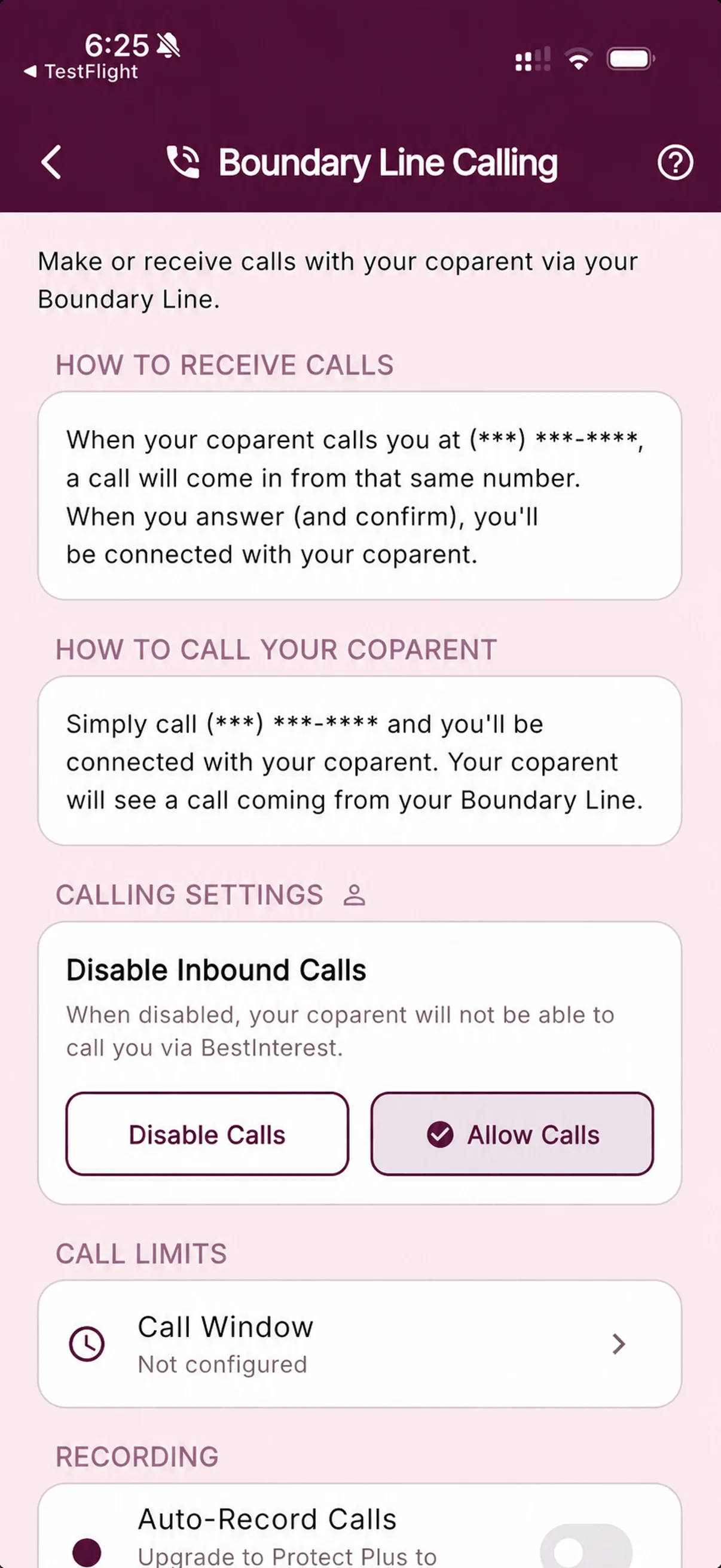
Choose whether calls or voicemail come through
Turn Voicemail off independently to stop new messages while keeping saved voicemail. Disable Calls blocks both incoming calls and voicemail.
Set a call window
Choose the hours when Boundary Line calls are allowed. Missed calls and calls outside those hours can go to voicemail on Protect Plus.
Export supported history
Organize supported message and call activity for attorney, mediator, or court review without relying on your personal phone history.
Questions, answered
Boundary Line™ FAQ
How do I message a co-parent who refuses to use a co-parenting app?
Use BestInterest’s Boundary Line. On Connect or higher, you’re assigned a BestInterest number that your co-parent can text or call from their regular phone — nothing to install. Messages are routed into BestInterest and retained with timestamps. Protect and Protect Plus add Message Shield and Tone Guardian.
Does my co-parent need to download anything to use Boundary Line?
No. That’s the whole point. Your co-parent uses their normal phone’s texting and calling to reach your Boundary Line number — no app, no account, no invite. Only you use the BestInterest app; they don’t even need to know you’re using it.
Can I call my co-parent using my Boundary Line number?
Yes. Open Solo Calls in BestInterest and tap Call Coparent, or dial your own assigned Boundary Line number from the cell phone number saved to your BestInterest account. Either route launches the carrier call in your phone app. BestInterest routes the call to your co-parent, who sees it coming from your Boundary Line number.
How does Boundary Line voicemail work?
On Protect Plus, missed calls and calls outside your allowed call hours can go to voicemail. Saved audio and an automatically generated transcript appear in Call History alongside call recordings—there is no separate voicemail inbox. You can turn Voicemail off independently; Disable Calls blocks both incoming calls and voicemail. Turning Voicemail off does not remove messages already saved.
How is Boundary Line different from Solo Mode?
Solo Mode is the broader way to use BestInterest independently, with private tools for coaching, organization, and documentation. Boundary Line is an optional communication feature inside Solo Mode. It gives you a dedicated BestInterest number so your co-parent can text or call without joining the app or seeing your personal number.
Do I need my co-parent's agreement to use Boundary Line?
No. You can set up Boundary Line on your own. Your co-parent continues using ordinary texts and phone calls, so they do not need a BestInterest account, an app download, or an agreement to join BestInterest. Continue following any communication requirements in your parenting plan or court order.
What countries does Boundary Line support?
Boundary Line supports phone numbers in the United States, Canada, Australia, the United Kingdom, Puerto Rico, and additional countries where local numbers are available. The country selector during setup shows the current list. If your country is not listed, BestInterest’s Collaborative Mode is available globally.
How is Boundary Line different from other co-parenting apps?
OurFamilyWizard, TalkingParents, and AppClose require matched accounts for in-app messaging. Boundary Line instead lets the other parent use ordinary SMS or phone calls while you use BestInterest. This comparison was reviewed in July 2026; competitor features can change.
Are Boundary Line messages filtered and exportable?
Boundary Line on Connect routes and retains messages. Protect and Protect Plus add Message Shield for incoming messages and Tone Guardian for outgoing drafts. Supported records can be exported for professional or legal review, but admissibility and evidentiary weight vary by jurisdiction and case.
How much does Boundary Line cost?
Boundary Line is available in Solo Mode on the Connect plan ($9.99/month) and up. BestInterest’s free plan includes Solo Mode for private documentation and AI coaching; Boundary Line — messaging a co-parent who won’t join — is a premium feature.
Give coparenting communication its own line