
Find the detail without filing everything yourself.
Messages and journal entries add up quickly. Magic Tags™ privately organize eligible content by topic, so the school update, schedule change, or expense you need has a clearer place to live—and a faster path back to it.
Automatic Magic Tags are included with Protect and Protect Plus. Already using tags? See the Magic Tags Help Guide.
Organized in the background
The record can grow without becoming another pile to sort.
Magic Tags turn recurring co-parenting topics into private signposts, helping you move from remembering and scrolling to finding and acting.
Less filing as the history grows
Automatic topic labels reduce the work of sorting every useful detail into the right place yourself.
A faster path back to the detail
Return to related messages or journal entries by topic when the exact wording or date has slipped your mind.
Private organization that stays yours
Your co-parent does not see your tags, even when you attach one to a message you both can read.
One idea, two useful places
Organize messages and journal entries.
The same private organizing idea works across the conversation you receive and the record you create.
Messages
Give the conversation a topic
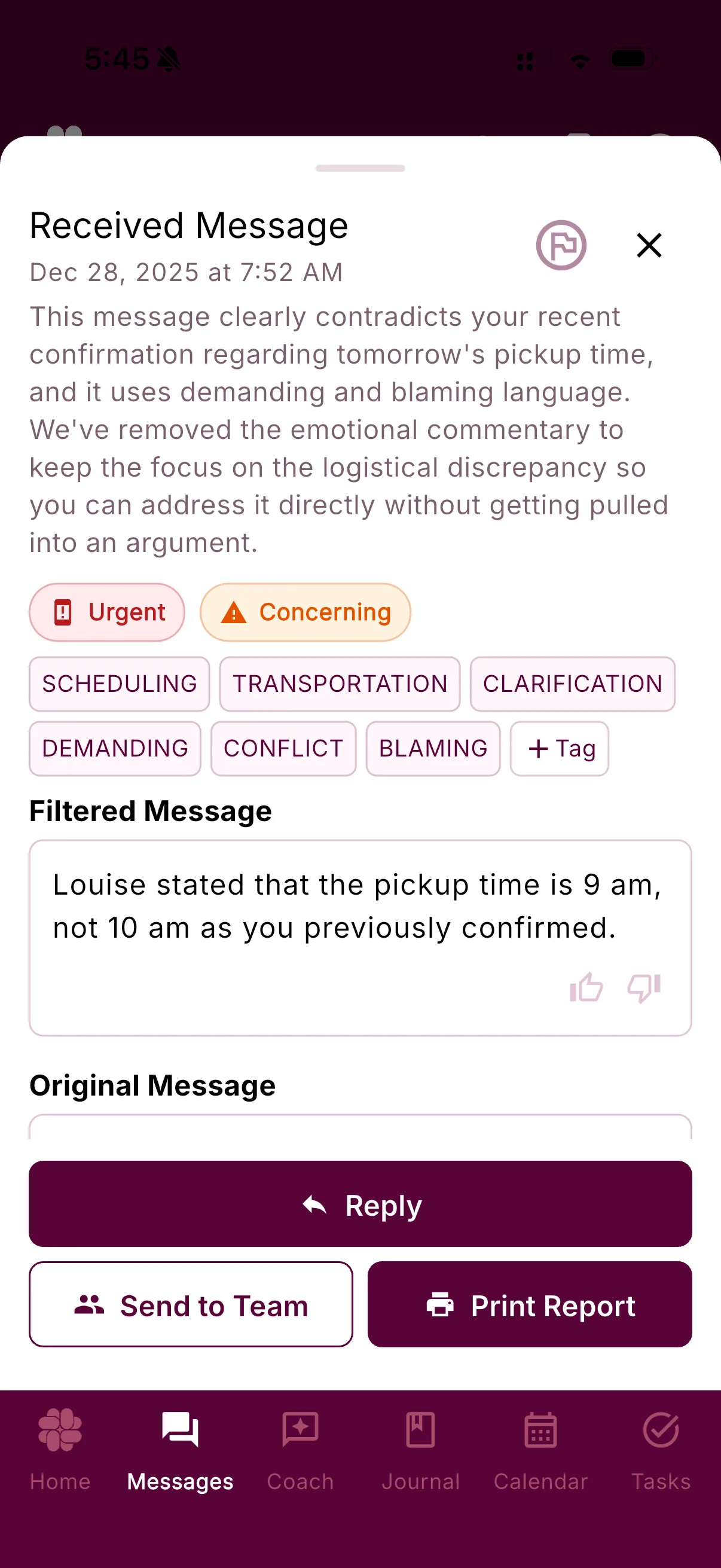
Eligible analyzed messages can receive tags for details such as scheduling, transportation, school, expenses, or medical care.
See Message ShieldPrivate journal
Let the record organize as you write
Magic Tags can categorize new journal entries automatically, helping a growing timeline stay easier to navigate.
See the JournalClear labels, clear jobs
Not every label means the same thing.
Magic Tags are AI-added topic categories. Your own tags are labels you create and manage. Both help you organize the details you may want later.
Message Shield classifications describe how BestInterest interpreted a message. Special classifications such as Urgent or Concerning are system-managed, even when they appear near topic tags in the app.
Magic Tags™
Added automaticallyYour tags
Added and managed by youSpecial classifications
Managed by Message ShieldQuestions, answered
Magic Tags FAQ
What are Magic Tags?
Magic Tags are private topic labels that BestInterest can add automatically to eligible messages and new journal entries. They help group details such as schedules, school, transportation, expenses, and medical updates so they are easier to find later.
Where does BestInterest use Magic Tags?
Magic Tags can organize eligible analyzed messages and new Coparenting Journal entries. You can use tags when reviewing or searching within those parts of the app.
Are Magic Tags the same as Message Shield classifications?
No. Magic Tags organize content by topic. Message Shield classifications such as Urgent or Concerning describe how the system interpreted a message and are managed by BestInterest rather than edited like ordinary tags.
Can I add or remove tags myself?
You can create and manage ordinary tags on supported messages and journal entries. Some system classifications added through Message Shield cannot be added or removed manually.
Can my co-parent see my tags?
No. Tags are private to your account, including tags attached to a shared message. They are for your own organization and do not appear in printed or exported reports.
Which plans include automatic Magic Tags?
Automatic Magic Tags are included with Protect and Protect Plus. You can compare current plan details on the BestInterest pricing page.
Can Magic Tags make mistakes?
Yes. AI can misunderstand context, choose an unhelpful category, or miss a useful one. Treat tags as an organization aid, review the underlying message or entry when accuracy matters, and manage ordinary tags as needed.
Find more. File less.