
How to Use Emotional Safety Settings in BestInterest
Looking for an overview of why these controls matter? Visit the Emotional Safety feature page.
Open Emotional Safety settings
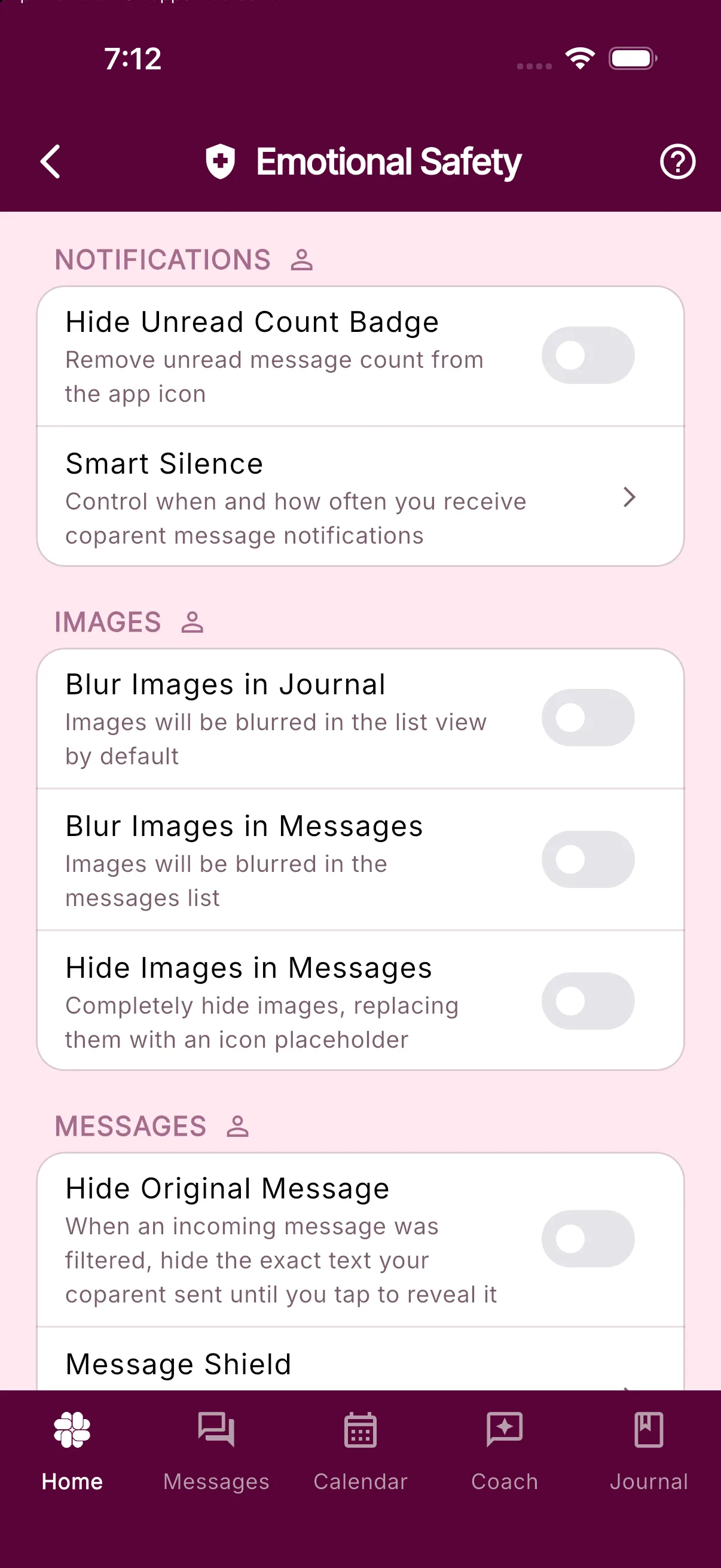
In the BestInterest app, open Settings > Emotional Safety. The person icon beside each section means these are private preferences for your account, not settings shared with your co-parent.
Notifications
- Hide Unread Count Badge removes the unread message number from the BestInterest app icon. New messages remain available in the app; the badge no longer creates a standing visual prompt.
- Smart Silence opens the notification-frequency controls. Depending on your plan, you can choose when non-urgent co-parent message notifications arrive instead of being interrupted by each message as it is sent. Learn how Smart Silence works.
Images
- Blur Images in Journal blurs images in the journal list by default.
- Blur Images in Messages blurs images in the message list.
- Hide Images in Messages replaces message images with an icon placeholder until you decide to view them.
These controls change what appears in your view; they do not remove the underlying image from the record.
Messages
- Hide Original Message works with Message Shield. When an incoming message has been filtered, the exact original wording stays behind a tap-to-reveal prompt. You can read the filtered version first and reveal the original only when you choose.
- Message Shield opens the incoming-message filter settings. Message Shield is available on eligible plans and can filter hostile or hurtful language before you see it.
Emotional Safety preferences are flexible. You can return to this screen and change them whenever your situation or needs change.
In Collaborative Mode, a Shared Spaces section also links to Kindness Check and Shared Features. Those controls apply to spaces you share with your coparent.
Which settings should I choose?
There is no single correct setup. Start with the kind of exposure that is hardest for you:
- If the app icon creates pressure, hide the unread badge.
- If frequent notifications interrupt work, parenting time, or sleep, review Smart Silence.
- If images are the concern, blur them first; use the hide option when you want a stronger boundary.
- If filtered messages are still difficult to open, keep the original wording hidden until you intentionally reveal it.
You can use these settings in both Solo Mode and Collaborative Mode. They control your personal experience inside BestInterest.
Important: These settings can reduce unwanted exposure inside BestInterest. They do not block a co-parent, replace a personal safety plan or protection order, or provide emergency monitoring. If you or a child may be in immediate danger, contact local emergency services.
Was this helpful?
Still need help?
Contact Support