
Talk when you need to. Keep your boundaries yours.
Some parenting details are faster to handle out loud. BestInterest gives linked co-parents in-app audio and video calls, while Boundary Line lets Solo Mode users call without sharing a personal number. Set when calls can reach you, keep your call history organized, and get back to the rest of your day.
Placing calls begins on Connect. Linked co-parents can receive and answer on Free. Protect Plus adds unlimited outgoing minutes, optional recording, and transcription for supported in-app calls.
From a real co-parent
“This app has given me peace and safety by not being harassed by my ex anymore. No more unexpected phone calls, name calling, etc.”
A call on your terms
A necessary call does not have to take over the rest of your day.
Sometimes talking is the clearest next step. BestInterest puts useful boundaries around that moment, so the call can happen without opening your personal number or your whole schedule to it.
Keep your personal number out of the exchange
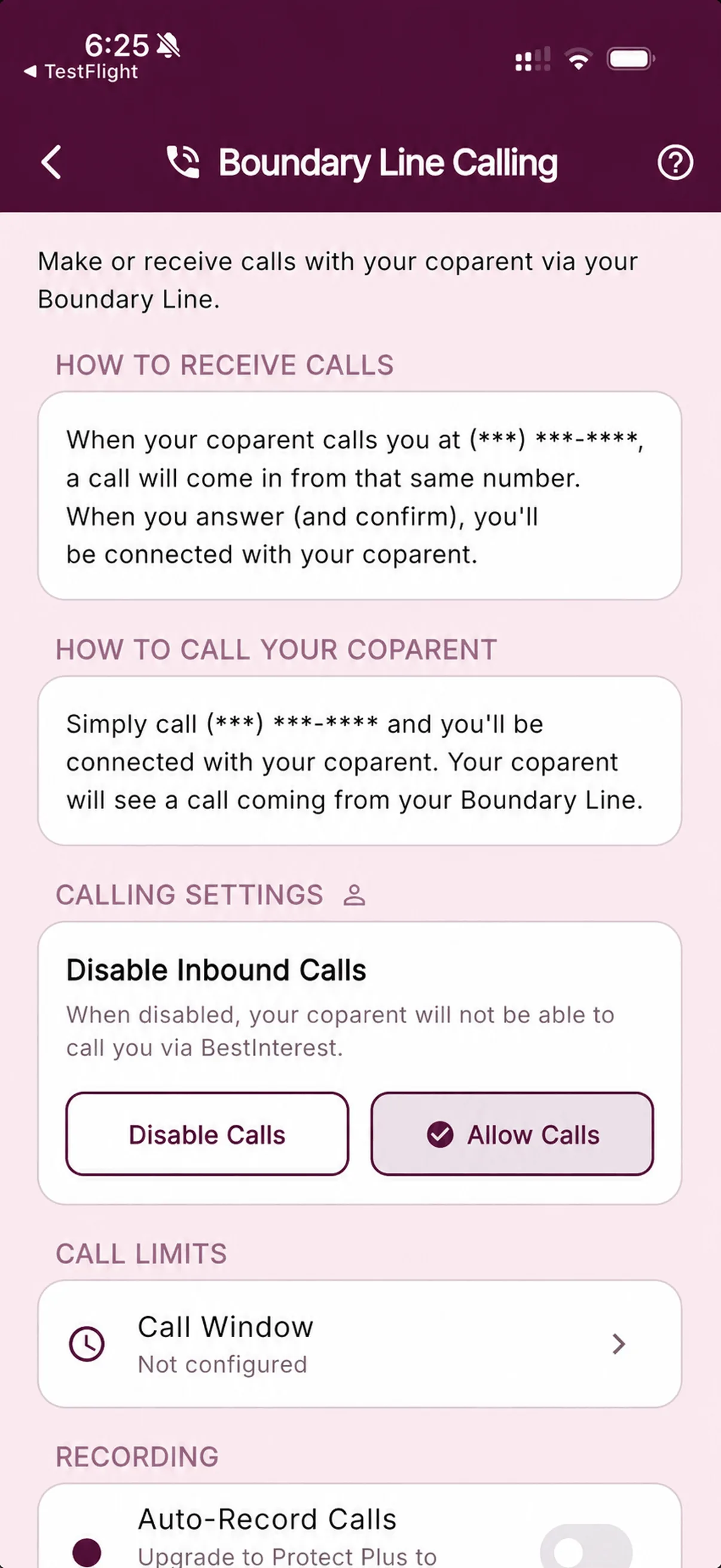
Use in-app audio and video in Collaborative Mode, or route Solo Mode phone calls through Boundary Line instead of sharing your personal cell number.
Decide when a call can reach you
Turn incoming calls off or set allowed time windows, so being reachable does not have to mean being reachable all day.
Keep more than a disappearing call
Supported call history keeps dates, status, duration, and other call details organized for your own review or a focused export later.
Two ways to call
Choose the channel that fits how you coparent.
When both parents use BestInterest, Collaborative Mode keeps audio and video calls inside the app. When only one parent uses BestInterest, Boundary Line gives Solo Mode users a phone channel that works with the other parent’s ordinary dialer.
The calling route changes with the mode. The goal stays the same: necessary contact with more separation and control.
Collaborative Mode
In-app audio & video
- Both parents use linked BestInterest accounts
- Only the caller needs Connect or higher
- The recipient can answer on BestInterest Free
- Choose audio or video for the conversation
Solo Mode · Boundary Line
Private-number phone calls
- Only you need the BestInterest app
- Your coparent uses their regular phone
- Your personal number stays out of the exchange
Before the phone rings
Set the terms before it rings.
Calling settings help you decide what kind of contact works, when it can happen, and what remains visible afterward.
Choose the format
Use audio or video in the app
Linked co-parents can choose the format that fits the moment without moving the conversation to another calling app.
Set availability
Open only the windows that work
Choose specific days and times when incoming calls are allowed, and change those windows as your situation changes.
Hold the boundary
Disable incoming calls when needed
Turn incoming calling off without giving up the rest of your BestInterest communication and organization tools.
Keep the trail
See missed and declined activity
Supported call activity stays visible, including calls that were missed, declined, or blocked by an availability boundary.
The call ends · The context can stay
If the call matters later, the details are easier to find.
Supported call history keeps the practical facts together: when the call happened, who placed it, whether it connected, and how long it lasted.
Protect Plus can add an optional recording after setup. Eligible in-app recordings can also produce a transcript. Call-report PDFs and CSVs organize the call log; recordings and transcripts remain separate files to review where available.
- 1
Conversation
The call happens - 2
Call history
Date, status, role, and duration stay organized - +
Protect Plus · Optional
Recording and supported in-app transcription - 3
Export
Create a focused PDF or CSV call log
Choose the calling capacity you need
Start with a protected channel. Add more room when it helps.
Receiving in-app calls is included on Free. Placing calls requires Connect or higher, with outgoing limits that grow by plan. Recording and supported in-app transcription are reserved for Protect Plus.
Connect
Start placing protected calls
Place in-app calls with 45 outgoing minutes per month and a 15-minute per-call limit. Your linked co-parent can answer on Free.
Protect
Add more room for conversation
Get expanded calling time alongside Message Shield, Tone Guardian, Smart Silence, and other protection around written exchanges.
Protect Plus
Call without watching the clock
Add unlimited calling, optional recording after setup, and transcription for supported in-app audio and video calls.
Questions, answered
Co-Parenting Calls FAQ
What types of co-parenting calls does BestInterest support?
Collaborative Mode supports in-app audio and video calls between linked BestInterest accounts. Solo Mode supports phone calls through Boundary Line, so the other parent can use their regular phone without joining the app.
Does my co-parent need BestInterest to call me?
For in-app audio or video calls, both parents need linked BestInterest accounts in Collaborative Mode, but only the person placing the call needs Connect or higher. The recipient can enable and answer calls on Free. With Boundary Line in Solo Mode, your co-parent can call the assigned BestInterest number from their regular phone without installing the app.
Does BestInterest keep my personal phone number private?
In-app calls do not require you to exchange personal phone numbers. Boundary Line routes supported phone calls through an assigned BestInterest number so your co-parent does not need your personal number.
Can I control when calls ring?
Yes. Calling settings let you disable incoming calls or set allowed time windows. Calls blocked by those settings do not ring, and supported missed or declined call activity remains available in BestInterest.
Are BestInterest calls recorded or transcribed?
Only Protect Plus supports optional call recording after you enable it and acknowledge the applicable consent requirements. Eligible in-app audio and video recordings can be transcribed. Boundary Line phone recordings are not currently transcribed.
Which BestInterest plans include calling?
Receiving in-app calls is included on Free. Placing calls begins on Connect, with 45 outgoing minutes per month and a 15-minute per-call limit. Protect includes 200 outgoing minutes per month and a 60-minute per-call limit. Protect Plus includes unlimited outgoing calling, optional recording, and transcription for supported in-app calls.
What does a BestInterest call report include?
Call reports can include supported history such as date and time, direction or participant role, status, duration, and whether recording was enabled. The report does not embed the audio, video, or transcript.
Can I use a BestInterest number to call emergency services?
No. BestInterest calling is for communication with your co-parent. In an emergency, call 911 or the emergency number where you are located.
Talk on your terms