
How Your Coparenting Relationship Answers Shape Coach and Message Shield
BestInterest asks a handful of questions about your coparenting situation. Your answers steer three AI features: Coparent Coach, Message Shield (incoming messages), and Tone Guardian (messages you send). This page explains where each answer lives, what it does, and why your coparent never sees any of it.
Where the answers live
The questions sit on two screens:
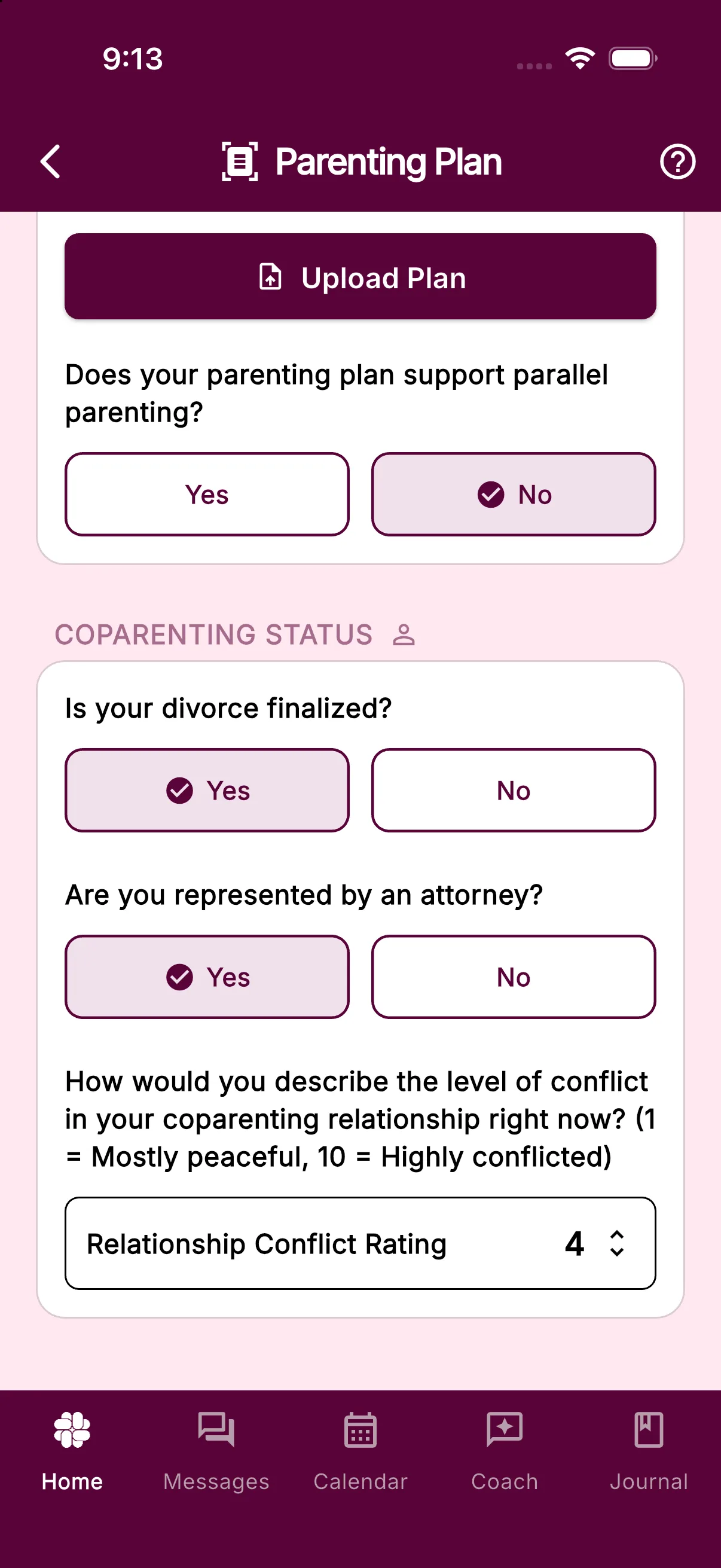
- Settings > Parenting Plan, in the COPARENTING STATUS card at the bottom of the screen. This holds your conflict rating, attorney status, and divorce status. The parallel parenting question sits higher up on the same screen under PARENTING PLAN.
- Settings > Tone Guardian, under Communication Style. This holds the Grey Rock switch.
Settings is the button below your dashboard tools on Home. If you need a map of the whole screen, read Where to find every setting. One thing to know: Settings > Coparenting History is a log of family actions such as tasks, expenses, and Binder changes. It is not where these questions live.
Rate your conflict level
Setup asked you this on its first screen, with a note that the answer stays private. Relationships change, so re-rate whenever things shift.
- Open Settings > Parenting Plan.
- Scroll to COPARENTING STATUS.
- Tap Relationship Conflict Rating. The current number shows on the right, or a dash if you have never rated.
- In the Relationship Rating wheel, spin from 1 Mostly peaceful to 10 Highly conflicted and tap Done.
The number saves straight away. A rating of 3 or lower tells Coach and Message Shield to treat your relationship as collaborative, so they expect some friendly back-and-forth and do not read hostility into ordinary messages. A rating of 4 or higher switches both to high-conflict framing: Coach leans toward de-escalation, documentation, and firm child-centred boundaries, and Message Shield reviews incoming messages with the assumption that court involvement and difficult communication are possible.
The number you gave at setup is kept separately as your starting point, so re-rating never erases it.
Mark a parallel parenting plan
- Stay on the Parenting Plan screen and look under PARENTING PLAN for the question Does your parenting plan support parallel parenting?
- Pick Yes or No.
Yes tells Coach and Message Shield that contact should stay minimal and logistical, and that many messages need no reply at all. No tells them a standard collaborative plan is in place and some friendly interaction is expected. If you are unsure, leave it on No.
The question disappears once you upload your plan or a review is in progress, because the review reads this from the document itself. See How to upload your parenting plan.
Record attorney and divorce status
Both live in the COPARENTING STATUS card:
- Are you represented by an attorney? Tap Yes or No. Coach and Message Shield are told either that you have a family law attorney or that you are representing yourself, and adjust their advice about next steps accordingly.
- Is your divorce finalized? Tap Yes or No. This is saved with your profile alongside the other answers.
Choose Grey Rock
Grey Rock is a low-engagement style: short, factual, boring replies that give a conflict-seeking coparent nothing to push against.
- Open Settings > Tone Guardian.
- Make sure the Tone Guardian switch is on. The Communication Style card only appears while review is enabled.
- Under Communication Style, tap Default or Grey Rock. The text beneath the buttons changes to describe the mode you picked.
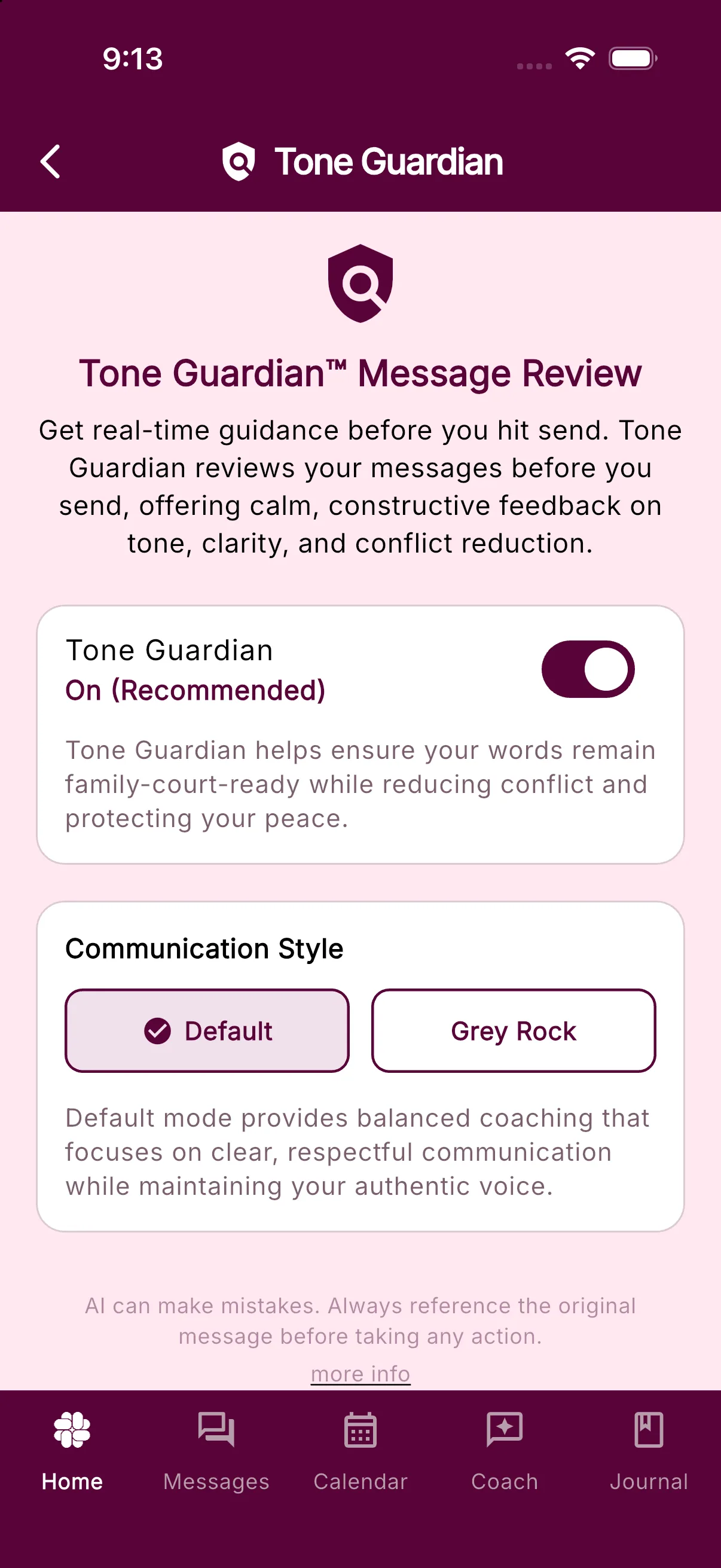
With Grey Rock selected, Tone Guardian rewrites go into a strict mode that strips everything except the logistics, and Coach and Message Shield keep suggested replies very short, favouring answers like “Ok” wherever possible. With Default, Tone Guardian coaches for clear, respectful wording while keeping your own voice. More on the review itself is in How to adjust Tone Guardian settings.
Who can see these answers
Nobody but you. The COPARENTING STATUS header carries the Private icon, and tapping it shows This Setting is Private. Every answer on this page is written to your own user profile, which BestInterest’s security rules let only your signed-in account read. Your coparent has no route to your conflict rating, attorney status, divorce status, or Grey Rock choice, even in Collaborative Mode. The one shared item on the Parenting Plan screen is the uploaded plan document itself, which both connected coparents can open. The full breakdown is in What is shared with my coparent?.
Related
Frequently asked questions
Where do I change my conflict rating?
Settings > Parenting Plan, under COPARENTING STATUS. Tap Relationship Conflict Rating, spin to a number from 1 to 10, and tap Done. You first answered this question during setup.
What does the conflict rating change?
A rating of 3 or lower tells Coach and Message Shield to treat your relationship as collaborative. A higher rating switches them to high-conflict framing: de-escalation, documentation, and protection from provocative messages.
Can my coparent see these answers?
No. The COPARENTING STATUS card and the Tone Guardian Communication Style are marked Private in the app and are stored on your own profile, which only you can read.
Where is the Grey Rock setting?
Settings > Tone Guardian, under Communication Style. Choose Default or Grey Rock. The card only shows while Tone Guardian is switched on.
Was this helpful?
Still need help?
Contact Support