
Your phone can be unlocked. BestInterest can still stay private.
Phones get handed to children, friends, and coworkers. Privacy Lock gives BestInterest its own device-authentication checkpoint, so an unlocked phone does not automatically become an open view into your messages, journal, coaching, images, and other app records.
Available in the BestInterest iOS and Android apps on supported devices. No plan upgrade required.
Privacy beyond the phone lock
Hand over your phone without handing over your coparenting space.
A child may need a game. A friend may need directions. A coworker may need to check one detail. Privacy Lock adds another boundary around BestInterest when the rest of the phone is already available.
A checkpoint after the phone is already unlocked
If someone briefly handles your unlocked phone, BestInterest can still require device authentication before the app view appears.
The unlock method you already use
Use supported Face ID, fingerprint, PIN, or passcode authentication from your device instead of creating another password to remember.
Protection that returns with the app
Once enabled, Privacy Lock returns on a cold start and after BestInterest has been in the background long enough to lock again.
One setting. Your device confirms it.
Turn it on in a few taps.
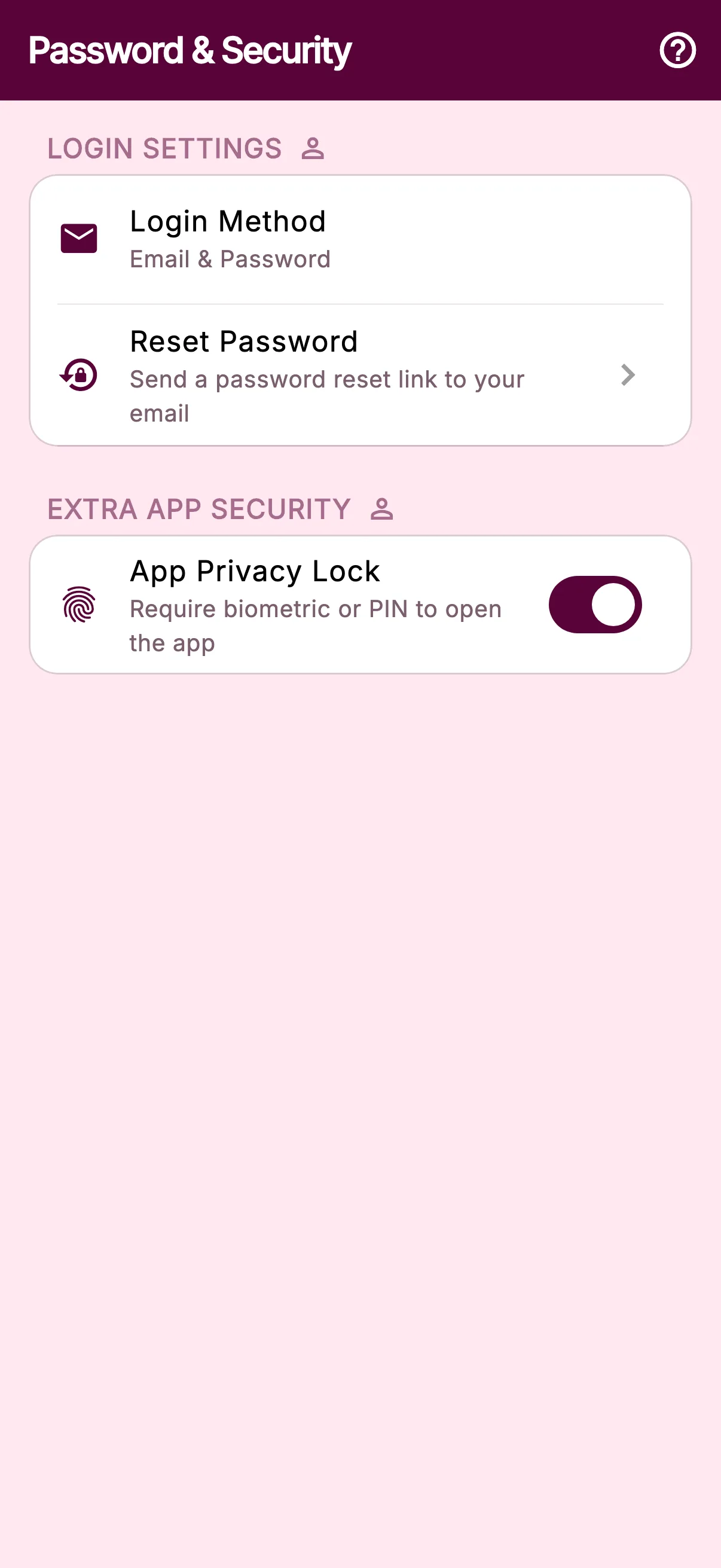
Open Settings → Password & Security, turn on App Privacy Lock, and complete your phone’s authentication prompt. BestInterest requires the same proof before the setting can be turned off.
After setup, the unlock experience stays familiar because the phone—not a separate BestInterest password—controls which local authentication options are offered.
- 1
Open
Settings - 2
Choose
Password & Security - 3
Enable
App Privacy Lock - 4
Confirm
Authenticate with your device
One lock around the app view
Everything inside BestInterest waits at the same door.
Privacy Lock does not ask you to protect one message or file at a time. It covers the app view on that device until authentication succeeds.
Communication
Messages stay behind the app checkpoint
The BestInterest view remains covered until authentication succeeds, including the conversations and coaching available inside it.
Private records
Your journal does not open with the phone
Private journal entries, attached images, and other personal records inside BestInterest remain behind the same access check.
Family details
The rest of the app waits too
Calendar, expense, document, and account views do not appear until the device authentication prompt is completed.
Built for mobile
Use the security already built into your phone.
Privacy Lock is available in the BestInterest iOS and Android apps when the device supports local authentication. Depending on the phone and its settings, that can include Face ID, fingerprint, PIN, or passcode.
The feature is not available in the web app because browsers use different session and device-security controls.
App Privacy Lock
One extra check. No extra password.
- Supported iPhone and Android devices
- Uses the phone’s local authentication
- Included without a plan upgrade
Questions, answered
Privacy Lock FAQ
What does Privacy Lock protect?
Privacy Lock places device authentication in front of the BestInterest mobile app. Until authentication succeeds, the app view stays covered—including the messages, journal entries, coaching conversations, images, and other records available inside the app on that device.
When does Privacy Lock appear?
After you enable it, BestInterest locks on a cold start and when you return after the app has been in the background long enough to require authentication again.
How do I unlock BestInterest?
BestInterest uses the local authentication methods configured on your phone, such as Face ID, fingerprint, PIN, or passcode, depending on the device and operating-system settings.
Do I need a separate Privacy Lock password?
No. Privacy Lock uses your phone's existing local authentication. BestInterest does not ask you to create or remember another password for this feature.
What if biometric authentication is unavailable?
Your device may offer its PIN or passcode as a fallback. If the phone does not support a local authentication method that BestInterest can use, the App Privacy Lock setting is unavailable.
Is Privacy Lock available on the web?
No. Privacy Lock is available in the BestInterest iOS and Android apps on supported devices. The BestInterest web app uses different browser and session security controls.
Does Privacy Lock hide notification previews?
No. Privacy Lock controls entry to the BestInterest app. Use your phone's notification settings to limit or hide preview text on the lock screen.
Does Privacy Lock encrypt individual messages or files?
No. Privacy Lock is an additional app-access check. It does not add separate encryption to each item, prevent screenshots after the app is unlocked, change what a connected co-parent can see, or replace strong device and account security.
One more boundary for what is private